
Key takeaways
- Threat actors are exploiting Microsoft 365’s Direct Send feature to deliver phishing emails that appear to originate from within the organisation, undermining internal trust and increasing the risk of successful social engineering attacks.
- Phishing messages often evade built-in defences, landing in users’ junk folders despite being flagged by Microsoft’s composite authentication checks.
- Lures are highly effective and business-themed, frequently using pretexts like task reminders, wire authorisations and voicemails to entice user interaction.
- This campaign reflects a broader trend of adversaries abusing legitimate cloud services to bypass security controls, making it essential for organisations to reassess their email authentication and relay configurations.
Overview
Proofpoint identified an active phishing campaign exploiting Microsoft 365 Direct Send, which delivered spoofed messages that appeared as internal emails.
The threat actor used unsecured third-party email security appliances as an SMTP relay and VPS assets for message injection. In many cases, Microsoft marked the messages as spoof attempts based on composite authentication failures. Unfortunately, the messages were still delivered to users’ junk folders, allowing the payloads to reach end users.
Introduction
Direct Send is a feature in Microsoft 365 that allows devices and apps to relay messages to Microsoft tenants without authentication if the recipients are inside the organisation. It is intended for multifunction printers and legacy applications. However, it can be misused to deliver unauthenticated messages that appear as internal emails. Put simply, this allows an external attacker to send emails that appear to come from within the organisation without needing a valid account or password.
We have observed evidence in recent email security proof of concepts where threat actors are exploiting this feature to inject spoofed phishing emails that bypass sender verification controls. This tactic allows attackers to send malicious payloads to Microsoft 365 users with increased credibility, often resulting in successful delivery despite failed authentication checks.
Delivery
Proofpoint observed multiple messages injected into Microsoft 365 tenants via unsecured third-party email security appliances used as SMTP relays. The sending infrastructure presented valid DigiCert SSL certificates and SMTP services supporting AUTH PLAIN LOGIN with STARTTLS. Appliances exposed ports 8008, 8010 and 8015 with expired or self-signed certificates.
Message injection flow
- Attackers connect to virtual hosts running Windows Server 2022 via RDP on port 3389.
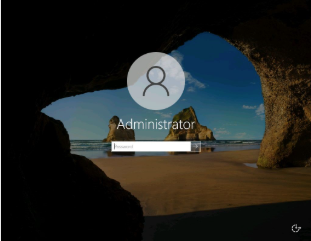
Microsoft admin login. - SMTP connections are initiated from these hosts to unsecured third-party email security appliances hosted by a regional IaaS provider.
- Messages are relayed through these appliances to Microsoft 365 tenants belonging to targeted organisations.
- Messages are delivered to Microsoft 365 via Direct Send using a spoofed internal From address.
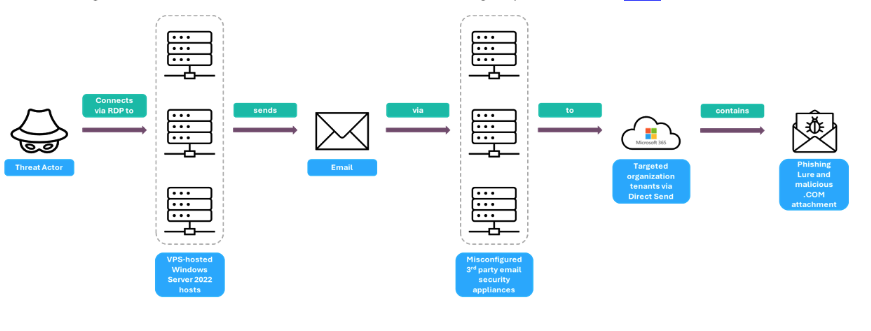
Illustration highlighting delivery of spoofed messages via Microsoft Direct Send.
Conclusion
The abuse of Microsoft 365’s Direct Send feature isn’t just a technical flaw. It’s a strategic risk to an organisation’s trust and reputation. This campaign demonstrates how attackers continue to weaponise legitimate Microsoft 365 features to target organisations with threats. By relaying through unsecured mail infrastructure and spoofing internal domains, they achieve high credibility and inbox delivery despite authentication failures. When users can no longer trust internal emails, productivity suffers, and the risk of successful social engineering attacks increases dramatically.
This campaign is part of a broader trend where adversaries exploit trusted cloud services to launch attacks and evade detection. As organisations continue to adopt Microsoft 365 at scale, understanding and mitigating these risks is essential to maintaining a secure digital workplace. CISOs and IT leaders must proactively assess their exposure to Direct Send abuse and champion the implementation of secure email relay practices to protect internal trust and organisational resilience. Organisations should treat Direct Send as a risk vector and implement a system of secure authentication for application-generated email like Proofpoint Secure Email Relay.
Recommended actions for Microsoft 365 customers
Here are some tips for protecting your organisation:
- Determine whether your organisation is actively using Direct Send; if appropriate, enable ‘Reject Direct Send’ via PowerShell: Set-OrganizationConfig -RejectDirectSend $true
- Audit mail flow rules for accepted unauthenticated relay IPs; monitor message headers for spoofing attempts that are flagged by Microsoft with compauth=fail
- Enforce email authentication (SPF, DKIM, DMARC) with strict DMARC reject and SPF hard fail policies, where possible, by partnering with a trusted service like Proofpoint Email Fraud Defense to ensure email deliverability of legitimate email
- Use advanced email security solutions like Proofpoint Core Email Protection to bolster Microsoft’s native protections
IOCs
|
Self-Signed SSL Certificate |
Notes |
|
CN=WIN-BUNS25TD77J |
CN used by attacker-controlled Windows Server 2022 hosts |
|
|
|
|
IP Address |
Notes |
|
163.5.112[.]86 |
Attacker-controlled Windows Server 2022 host used to initiate SMTP connection |
|
163.5.160[.]28 |
Attacker-controlled Windows Server 2022 host used to initiate SMTP connection |
|
163.5.160[.]119 |
Attacker-controlled Windows Server 2022 host used to initiate SMTP connection |
|
163.5.160[.]143 |
Attacker-controlled Windows Server 2022 host used to initiate SMTP connection |
|
163.5.169[.]53 |
Attacker-controlled Windows Server 2022 host used to initiate SMTP connection |
|
|
|
|
Observed Lures |
|
|
“Your-to-do-List/MM/DD/YYYY” |
|
|
“Wire-eAuthorization approvalMM/DD/YYYY” |
|
|
“Payment ACH-Wire Authorization” |
|
|
“Daily Reminder: Today’s Tasks – MM/DD/YYYY” |
|
|
“Reminder – To Do – MM/DD/YYYY” |
|
|
“WIRELESSCALLER(XXX)YYY-ZZZZ-MM/DD/YYYY” |
|