
Key takeaways
- Integrated abuse mailbox provides analysts with triage for user-reported email from a single screen.
- The Timeline provides context, showing everything that happened, end to end.
- One-click response ensures the message can be quarantined organization-wide.
Managing user-reported emails is a critical part of email security operations. But multiple portals, manual steps, and limited context create obstacles that slow down investigations and lead to inconsistent outcomes.
Abuse mailbox in Proofpoint’s Threat Protection Workbench brings triage, analysis, and remediation together in one place. Supported by automation and global threat intelligence, your security operations center (SOC) can act faster and spend less time on manual tasks. Plus, they can access a complete investigative record.
The value—in plain terms
These are just a few of the benefits of the integrated abuse mailbox:
- Eliminate complexity. Analysts work in a single, intuitive interface for triage, analysis, and remediation. There’s no portal hopping. Analysts spend less time context switching and do fewer handoffs.
- Standardize response. Pre‑configured workflows give one‑click, consistent actions across the organization. This reduces variability and accelerates time to resolution.
- Respond decisively. Teams can access a full message timeline, advanced search, and reporter insights. Plus, with strategic attribution, messages are mapped to Very Attacked People (VAP)™ profiles and global campaigns. As a result, teams have the context they need to make informed decisions.
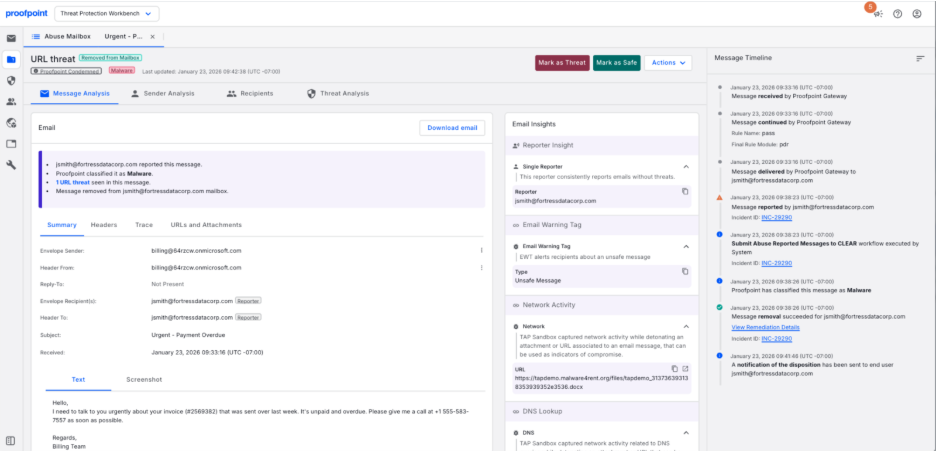
Figure 1. Centralized view of all investigation context for a user-reported email.
How it works day to day
Here’s what your team can expect:
- All reported messages, one view
Abuse Mailbox surfaces user‑reported emails directly in Workbench. Analysts can filter and group messages by disposition, sender, recipient, and subject. They can also pivot quickly with dynamic column filtering and sort controls. - Go deep with an end‑to‑end timeline
Teams can see every step in one place—from inbound gateway processing and applied rules to user-reported emails, analyst actions, and workflow outcomes. This complete timeline makes handoffs easier. Plus, it supports audit requirements and gives stakeholders confidence in your process. - Choose a one-click response with Cloud Threat Response (CTR) workflows
Pre-seeded CTR workflows are triggered by the Mark as Threat and Mark as Safe buttons. And they can be customized by SOC teams out of the box:
- Mark as Threat. Set disposition (for example, “phish”), quarantine/remove messages organization-wide, notify the reporter, and update the incident.
- Mark as Safe. Set disposition (for example, “low risk”) add context, notify the reporter, and close the incident. These can be edited to match your runbooks; no cloning required.
4. Fine‑tune with reporter insights
View who reported the message and assess their accuracy across the organization. This helps to prioritize responses and guides training efforts.
5. Handle exceptions with precision
Automation drives efficiency, but flexibility matters. Analysts can take additional actions—running manual CTR workflows, setting dispositions, or reporting false positives and negatives—whenever context or judgment is required. All actions are logged for traceability. This ensures teams have more control without sacrificing visibility, trust, or oversight.
Why choose Proofpoint
Abuse mailbox integrated with Threat Protection Workbench helps SOC teams move from manual, fragmented processes to a faster, more consistent response. It helps achieve:
- Faster investigations and reduced dwell time
- Complete audit trails for compliance
- Better prioritization for training and engagement
- Reduced analyst fatigue and risk of error
Ready to respond smarter?
Stop wasting time on fragmented workflows and limited context. Some competitive point solutions may flag anomalies, but they can’t tell you who’s behind the attack or map campaigns to global threat actors. That leaves your SOC with a lot of unanswered questions, which slows down their response and increases the attacker’s dwell time.
Proofpoint’s integrated abuse mailbox is different. You get unified triage, analysis, and remediation in one interface. Plus, automated response with pre-configured workflows, and threat-based intelligence is delivered right to you. The result is faster investigations, complete visibility, and strategic insight that our competitors can’t match.
Whether you’re a current customer or evaluating Core Email Protection, contact us to learn how abuse mailbox integrated with Theat Protection Workbench can save you time. Or check out this guided demo to learn more.