
Microsoft Direct Send is a method in Microsoft 365’s Exchange Online service that allows devices, applications, or on-premises systems to send email through Microsoft’s Exchange Online servers without using a user mailbox or credentials. It’s commonly used when email needs to be sent from devices or apps that don’t support authentication in the standard way. While this can simplify setup for scanners, printers, and line-of-business apps, it also introduces potential security risks.
The problem with Direct Send
Direct Send uses Microsoft’s mail servers (SMTP) to send messages without authentication. This makes setup simple, but it also creates significant risks. Without authentication, anyone can spoof your domain and send mail through Microsoft’s infrastructure. Messages sent this way often appear to your internal users as trusted, since they originate from Microsoft servers, giving attackers an easy way to bypass suspicion. As a result, phishing and fraud campaigns can be launched without ever compromising a legitimate account.
Direct Send simplifies setup, but it was not designed for today’s advanced phishing, spoofing, and compliance requirements. That leaves organizations exposed if they rely on it as their primary method for application-generated mail.
Why Proofpoint Secure Email Relay is different
To eliminate these risks, organizations are turning to Proofpoint Secure Email Relay (SER). Unlike Direct Send, SER provides a controlled, authenticated, and secure path for application and device-generated email.
Built for enterprises that depend on Microsoft 365, SER delivers authenticated, policy-enforced mail relay, advanced threat scanning, and encryption, ensuring your Microsoft environment meets compliance and DMARC requirements without disruption.
Key benefits include:
- Authenticated relay. Only approved applications and devices can send, blocking impersonators.
- Advanced security. All messages are scanned for malicious content and for organization concerned with sensitive information, personally identifiable information (PII), or personal health information (PHI); encryption and DLP options are also available.
- Brand protection. Messages are DKIM-signed before being sent, to help meet DMARC requirements, reducing the risk of rejection or misuse.
- Centralized visibility and control. All non-human mail is funneled through one relay, giving IT and security teams complete insight into where messages originate and providing them the ability to centrally shut down sources if needed.
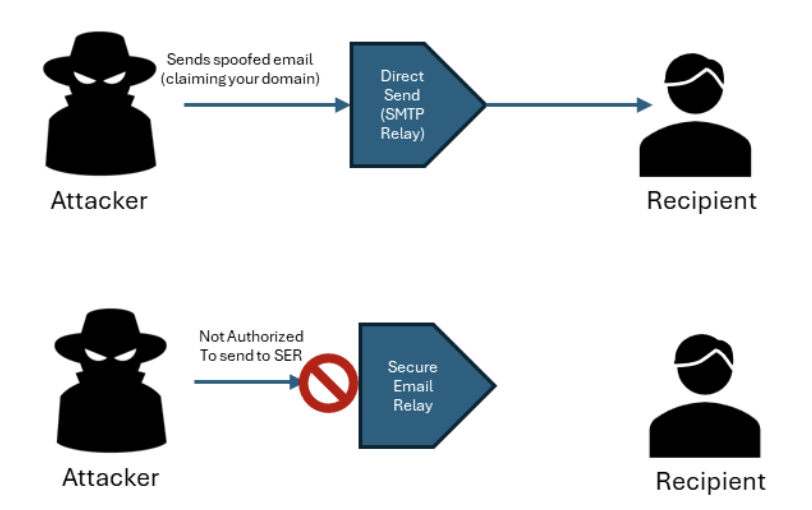
Figure 1. Secure Email Relay only permits authenticated sending sources to relay email.
The role of DMARC
Many organizations use DMARC for outbound messages to help eliminate domain spoofing and protect brand reputation. But equally important is the need to protect internal recipients from attackers’ impersonating your domains.
SER makes DMARC easier to adopt by ensuring application email is DKIM-signed and aligns correctly with your authentication policies.
And if you have not yet implemented DMARC for all your outbound email, Proofpoint can help with that as well. Proofpoint Email Fraud Defense combines tools and highly skilled resources to guide you through your DMARC journey.
Next steps
- Audit application email flows. Identify where Direct Send is still in use.
- Transition to Proofpoint SER. Route application and device mail through a secure relay.
- Enable SPF, DKIM, and DMARC. DKIM-sign all your device and application traffic and get your sending domains properly configured so you can enforce a strict reject policy for inbound traffic sent from your own domains.
- Educate stakeholders. Make sure business and IT teams understand why Direct Send is a liability.
In summary
Microsoft Direct Send was designed for convenience, but convenience is no longer enough. Attackers now exploit Direct Send to impersonate your domains and bypass trust. For enterprises running Microsoft 365, Proofpoint Secure Email Relay provides the authenticated, compliant, and threat-protected path for application and device-generated mail.
Learn more
Enhance your Microsoft 365 investment. Contact Proofpoint to learn how Secure Email Relay, Email Fraud Defense, and our flagship Prime Threat Protection extend Microsoft security to protect your brand, your people, and your data.