
Decades ago, email security was defined by secure email gateway (SEG) providers such as Barracuda, Cisco IronPort, FireEye/McAfee (now Trellix), Symantec Email Security.cloud (MessageLabs), Trend Micro, and Websense (now Forcepoint).
But the threat landscape has changed, and many legacy providers haven’t kept up. Years of underinvestment in this space have left organizations exposed to greater risk of a breach. Today’s attackers use multi-vector techniques and advanced threats—such as business email compromise (BEC), account takeover (ATO), and QR code phishing—across multiple platforms. They’re also exploiting AI assistants by embedding hidden malicious prompts in emails. Legacy email gateways were never designed to stop sophisticated, multichannel threats.
If you’re frustrated by missed detections, manual triage, and rising security operations center (SOC) costs, you’re not alone. Many of your peers have already switched from legacy email security deployments to Proofpoint—because it goes beyond what traditional SEGs can deliver. Our protection extends to wherever your people work—from email to Teams, Slack, SharePoint, OneDrive, and more—to defend against the threats that slip past other solutions. Based on real-world migration experiences, we’ve designed a practical roadmap to help you build a clear, well-documented migration plan that your leadership can get behind.
Step 1: Quantify the effectiveness of your protection
Start with the evidence. Pull reports of false negatives—like phishing, BEC, and malware threats that were delivered—from admin logs and downstream SIEM/IR tickets. Look at your abuse mailbox and ask: How many user-reported messages were real threats, and how many were false negatives that wasted analysts’ time?
And don’t stop at email. Document account takeover incidents like mailbox rule abuse, impossible travel, or geolocation alerts. Check to see whether collaboration tools—like Teams, Slack, SharePoint, OneDrive, and others—were exploited. Proofpoint’s research shows these attacks are on the rise.
Finally, run a free Proofpoint Rapid Risk Assessment to validate SEG gaps with real data. In just five minutes, it plugs into your email environment using a safe, read-only connection and instantly reviews the last two weeks of traffic. The assessment highlights advanced threats that your SEG missed—from phishing and ransomware to account takeover attempts—and identifies which of your users are most targeted. The result is an executive-ready report that quantifies risk and helps you build a business case for change.
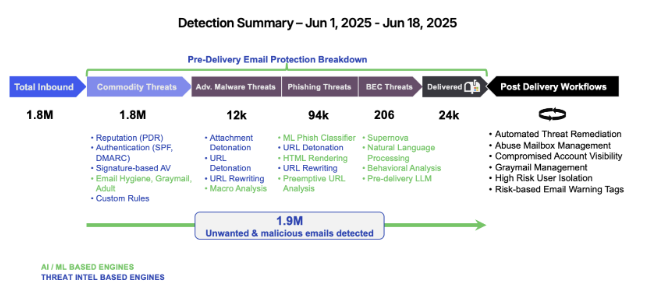
Figure 1: Sample report from a Proofpoint Rapid Risk Assessment: Detection Summary – Advanced Threats Missed by Incumbent.
Step 2: Calculate operational cost of business as usual
The cost of business as usual isn’t just missed detections. It’s the wasted analyst hours, repetitive tasks, and inefficiencies that drain your team. How many clicks and hours does it take your team to investigate a single phishing case? How much of their time is lost triaging user-reported spam? How long does it take to build an executive report with your current tools?
Investigations that should take minutes often stretch into hours, with analysts clicking through 12 or more screens just to confirm a single phishing case. Abuse mailbox triage can consume hours each week, yet most user-reported messages turn out to be false alarms rather than true threats. On top of that, security leaders often find themselves exporting data manually into spreadsheets just to prepare basic executive or board reports.
All of this adds up to analyst fatigue, slower response times, and a security team buried in noise instead of focusing on real risk.
Step 3: Choose your migration path
Migration isn’t one-size-fits-all. Every organization has different resources, timelines, and security priorities. Proofpoint is unique in offering three clear paths forward—SEG, API, or a phased journey—giving you flexibility that legacy email gateways simply can’t provide.
Many organizations choose to start by augmenting Microsoft 365 with Proofpoint API protection. This is the lowest-effort, highest-impact approach. It adds immediate protection against BEC, phishing, and account takeover while supporting teams that plan to transition off their SEG to Microsoft plus Proofpoint.
Others prefer a phased approach. This means starting with API to gain quick wins, then expanding into Proofpoint SEG for complete routing control, compliance, and layered defenses.
And for organizations that are ready to retire their legacy email gateway entirely, a full SEG replacement offers maximum control with complete pre-delivery blocking.
Step 4: Plan and pilot
Once you’ve chosen a migration path, the next step is to plan and pilot. Begin by defining what success looks like for your organization—whether it’s higher detection rates, fewer false positives, faster remediation, or stronger account takeover protection. A pilot lets you run Proofpoint alongside your existing SEG in monitor mode, so you can see the difference in real time without risk. It’s especially valuable to focus on your most targeted users, such as executives, finance teams, procurement, or IT administrators, who are often prime targets for phishing and fraud.
At the end of the pilot, you’ll have concrete evidence to share with leadership:
- A clear side-by-side comparison showing threats Proofpoint caught that your SEG missed
- An easy-to-read summary of coverage gaps
- A business value report that quantifies time saved and risk reduced in dollars
This data becomes a powerful tool to win executive buy-in and guide your next steps.
Step 5: Build your migration timeline
The final step is to build your migration timeline. How you proceed will depend on the path you chose in Step 3.
- If you augment Microsoft 365 with API-based protection, deployment is lightweight, and you can see immediate improvements in detection and visibility.
- If you’re starting with API and planning to move to SEG, a phased approach works best. Begin with the quick wins of API protection. Then expand into SEG for full routing control and compliance.
- And if you’re ready for a full SEG replacement, a structured three-phase cutover—pilot, parallel run, and final cutover—ensures continuity while minimizing risk.
No matter which path you take, align the migration with license renewals and budget cycles, consider opportunities for contract buyouts, and lean on Proofpoint’s white-glove migration support to make the process smooth and predictable.
Wrap-up
You don’t have to make this transition alone. Proofpoint partners with you every step of the way, providing migration playbooks, pilot templates, and other resources to simplify planning and decision-making.
We’ve worked with organizations of all sizes and industries to guide them through their SEG migration. One global engineering firm, for example, began by augmenting Microsoft 365 with API-based protection and later expanded to a full SEG replacement, demonstrating that Proofpoint makes it easy to get protection based on your team’s needs and timing. Learn why they switched from a Symantec SEG to Proofpoint.
Why Proofpoint
We’re trusted at scale: more than 2.7 million organizations worldwide, including over 80 of the Fortune 100, rely on Proofpoint for unmatched detection, analyst efficiency, and a clear roadmap of ongoing innovation. When you choose Proofpoint, you’re not just replacing a legacy gateway—you’re gaining a partner committed to keeping pace with the threats of today and tomorrow.
Start your migration journey with real world threat data
A free Proofpoint Rapid Risk Assessment gives you clear evidence of what your SEG is missing and builds the foundation for your migration plan. Request yours today and take the first step toward stronger protection.