
Key Takeaways
- Microsoft Entra Agent Identity extends Entra to AI agents and closely mirrors the traditional application model, inheriting many of the same opportunities for abuse.
- Proofpoint® researchers present “BluePhishing” as the next evolution of OAuth consent abuse, enabling attackers to leverage agent identities for initial access.
- Attackers can configure the blueprint with inheritable permissions and requiredResourceAccess (RRA), using consent links to gain initial access to a victim tenant.
- Consent to a malicious blueprint allows an attacker to establish agent identities and operate with granted privileges, using discoverable identifiers (e.g., tenant ID and user/sponsor object ID).
- The challenges of governance around agent identities and consent flows increase the risk of scalable and automated post-exploitation.
- This blog presents a research-based proof of concept. Proofpoint has not as of yet identified any in-the-wild activity, and emerging techniques should be carefully tracked as technology advances and policies surrounding new identity frameworks evolve.
Intro
As organizations rapidly adopt AI, Microsoft Entra’s agent identity model introduces new capabilities, while exposing a largely uncharted attack surface.
This blog introduces BluePhishing, an evolution of classic OAuth consent abuse, in which attackers socially engineer victims into granting consent to a malicious agent blueprint for initial access.
Analogous to app consent phishing where attackers use client credentials to gain initial access to a tenant, BluePhishing extends this technique to the agent ecosystem.
By exploiting gaps in visibility and governance around emerging AI agent adoption, attackers can abuse one-time consent links to create agent identities in target tenants, obtain access tokens, and operate with the privileges assigned to those agents.
Agent Identity Background
Microsoft Entra Agent ID is an identity and security framework that extends Entra to AI agents and shares several similarities with the existing application model. An agent blueprint (analogous to an app registration) defines the template for an agent, including its configuration and credentials. The blueprint principal (analogous to a service principal) represents this blueprint within a tenant.
An agent identity is a specific instance created from a blueprint. There can be up to 250 agent identities associated with a blueprint. This allows for multiple agent identities with delegated permissions scoped to a specific user context rather than the entire tenant.
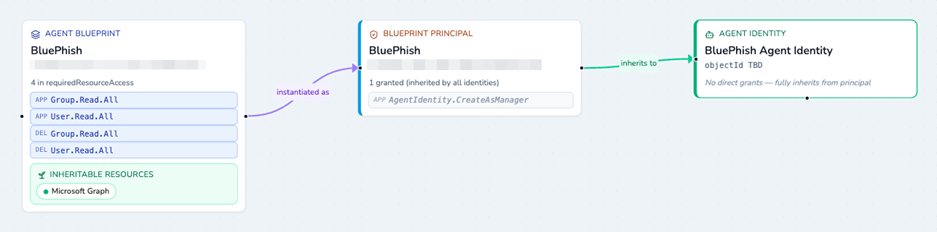
Figure 1: Relation between agent blueprint, blueprint principal and agent identities displayed using https://agent-permission-checker.pages.dev/
Microsoft 365 Message Center announcement MC1506733 details that default Microsoft Entra users will be able to create agent blueprints by default from November 2026, increasing organizational exposure to agent identity abuse and malicious consent scenarios.
BluePhishing Attack
The BluePhishing attack vector relies on socially engineering a victim into consent to a malicious agent blueprint. This consent can be used to provide an attacker a foothold to establish initial access in a tenant. The agent blueprint operates similarly to a multi-tenant application hosted in the attacker’s tenant where a client credential can be added.
When a victim grants consent to the agent blueprint (for example, via a consent link), a blueprint principal (analogous to a service principal) is created in the victim’s tenant.
The blueprint principal is automatically assigned the AgentIdentity.CreateAsManager application permission. This permission cannot be revoked from the principal and allows the attacker to obtain an app-only Graph token in the victim tenant to create tenant-local agent identities. The created agent identities can inherit the permissions assigned from the blueprint.
The attacker can then use the configured client credential to acquire tokens for those agent identities, enabling persistent access and further exploitation.
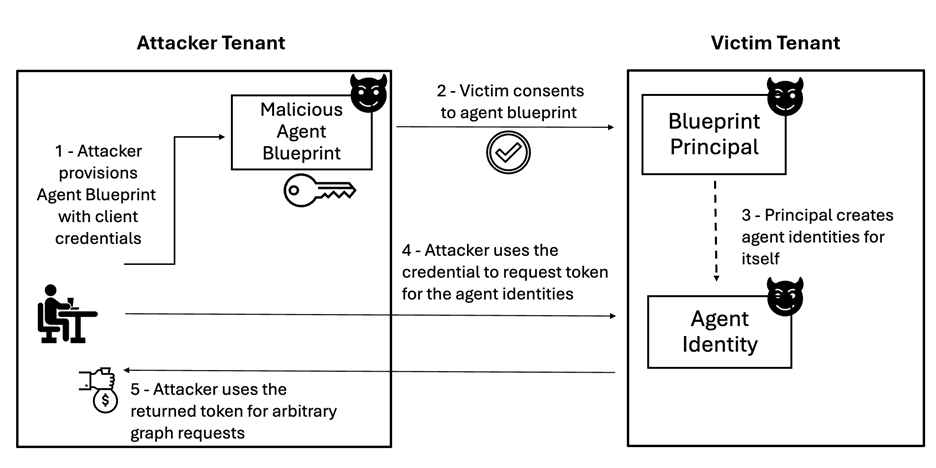
Figure 2: BluePhishing attack diagram
What information is needed by an attacker to conduct BluePhishing?
To conduct BluePhishing, the attacker provides values generated within their own tenant:
- Blueprint application ID
- Client secret
Additionally, the attacker must know the victim’s
- Tenant ID
- Sponsor (a user in the victim tenant required to create the agent identity).
Notably, these values are not considered sensitive and many methods are publicly documented for unauthenticated information disclosure of user accounts or the tenant id. For example, users can be enumerated with GetCredentialType (redfoxsec) endpoint and requests to the OpenID Connect endpoint https://login.microsoftonline.com/{tenant_name}/.well-known/openid-configuration will return the tenant id.
Detailed Attack Walkthrough
Note: We have notified Microsoft about this attack prior to publishing the attack details.
Configure agent blueprint
The attacker configures an agent blueprint in a tenant they control (Tenant A).

Figure 3: Agent blueprint configured in attacker-controlled tenant
The following properties should be configured on blueprint:
- Sign in audience
- Client secret
- Application and delegated permissions
- Required resource access (RRA) + Inheritable permissions
Application and delegated permissions
As with traditional OAuth applications, delegated permissions (scopes) and application permissions (roles) can be assigned to the agent blueprint, blueprint principal, and the derived agent identities.
Delegated permissions (exposed as the scp claim ) represent actions performed on behalf of a signed-in user and can be redeemed via the on-behalf-of (OBO) flow. In contrast, application permissions (exposed as the roles claim) represent app-only access without user context and can be obtained via the autonomous app OAuth flow.
SignInAudience
To enable external consent to an agent blueprint (“third-party blueprint”), the signInAudience must be set to AzureADMultipleOrgs. This setting is not exposed in the Entra portal but can be configured via Microsoft Graph, PowerShell, or by directly updating the blueprint manifest.
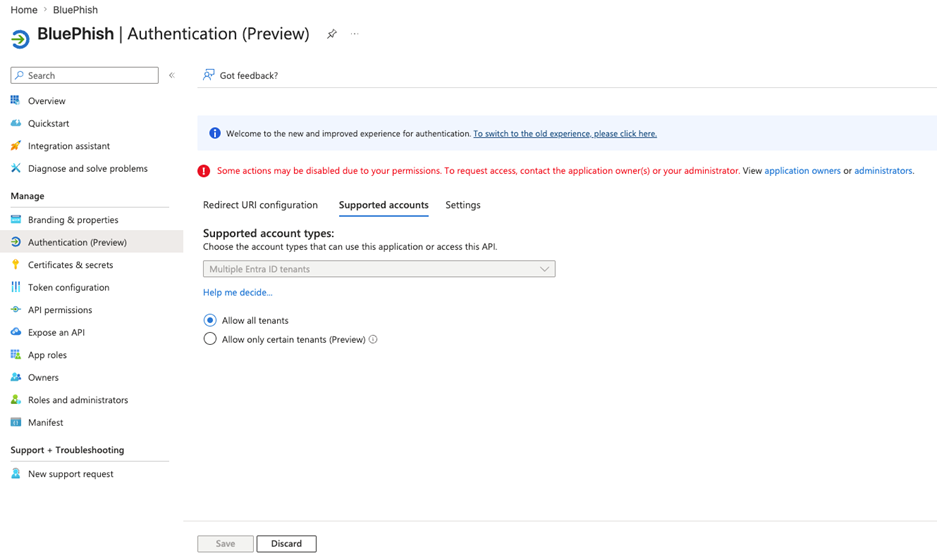
Figure 4: Sign in audience was set to "Multiple Entra ID tenants" via PowerShell, and cannot be modified through the Entra portal
RRA and inheritable permissions
RRA defines a static set of permissions upfront, while inheritable permissions ensure that permissions can be inherited by agent identities created from that blueprint.
While designed to simplify agent deployment, RRA and inheritable permissions can be used by an adversary to bundle broad permissions into a single one-time consent link, and ensure the consented permissions are automatically inherited across all agent identities.
According to Microsoft documentation, inherited permissions are not visible in the Entra portal or via Microsoft Graph, and only observable in the token contents at runtime. This lack of visibility could limit a defender’s ability to audit agent identities such as those operating with risky permissions.
Consent flow
The consent experience for agents mirrors that of OAuth applications, with the key difference being the use of an agent-specific identifier instead of a client_id.
For example, an admin consent link can be constructed as:
https://login.microsoftonline.com/{tenant}/v2.0/adminconsent?client_id={blueprint_id}&scope=https://graph.microsoft.com/.default &redirect_uri={redirect_uri}
.default, which grants all permissions pre-configured in requiredResourceAccess on the blueprint.
A web redirect URI can be configured (on the corresponding client application), however the consent link requires response_type=none as interactive token acquisition
is prevented.
During consent, users are presented with key information before granting permissions to trust the agent, such as name, publisher details and whether it is built by Microsoft.
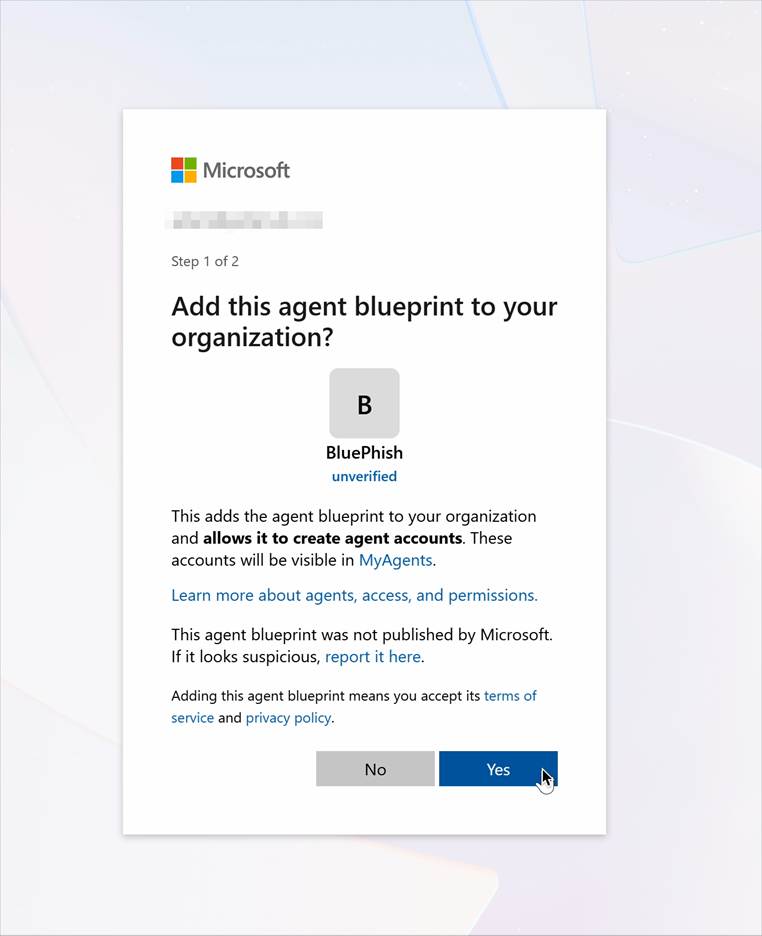
Figure 5: Agent blueprint consent (step 1) showing publish status
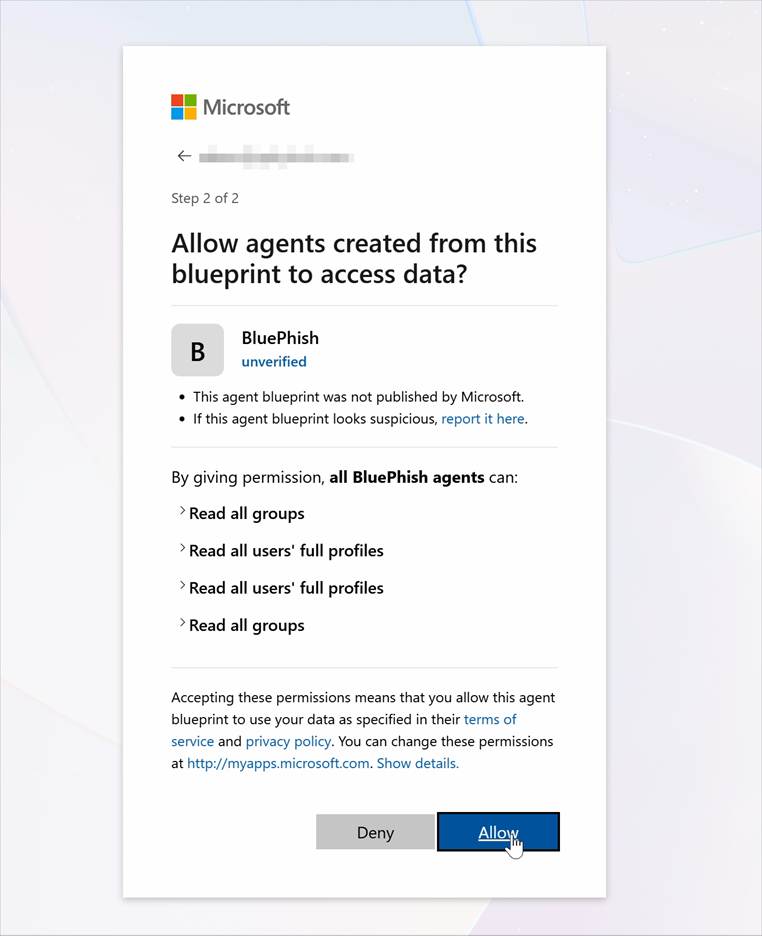
Figure 6: Agent blueprint consent dialogue (step 2) showing the inheritance to agents
Admin vs user consent
There are two types of consent: user consent and admin consent.
Application permissions require admin consent. This type of consent is more powerful for an attacker, as the permissions can be granted across the entire tenant with a single consent link. However, the phished user must have the privilege to grant admin consent.
A user consent link allows a user to grant delegated permissions which operate in the context of that user. Where the user does not have permission to consent, such as due to user consent policies, the request can be forwarded for admin approval.
Whilst user consent targets a broader range of lower privileged users, the limitation with delegated permissions is that they cannot be redeemed via autonomous flow. Alternative authentication flows, such as the OBO flow, require an additional stage of user consent to redeem these delegated permissions.
During testing, silent inheritance of permissions from the blueprint principal to the agent identity was only observed for delegated permissions granted by a user consent link, whereas permissions granted via admin consent links had the grant source “inherited from parent”.
Create Blueprint Principals
Once the victim accepts the consent link, a blueprint principal is created in the victim’s tenant.
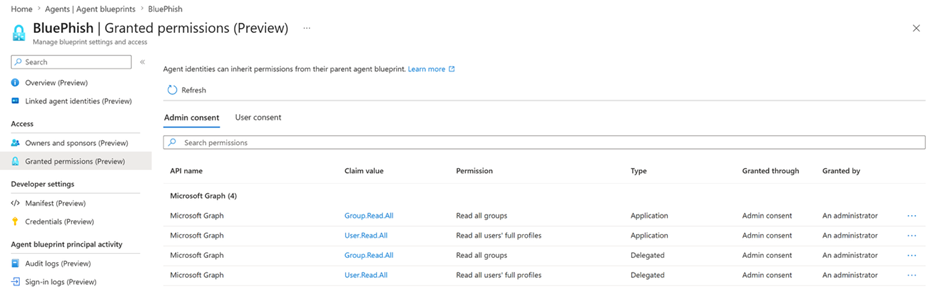
Figure 7: Blueprint principal in victim tenant with admin consent permissions
By default, blueprint principals were observed to have an implicit admin-consent permission, AgentIdentity.CreateAsManager, to allow the blueprint to create agent identities linked to itself.
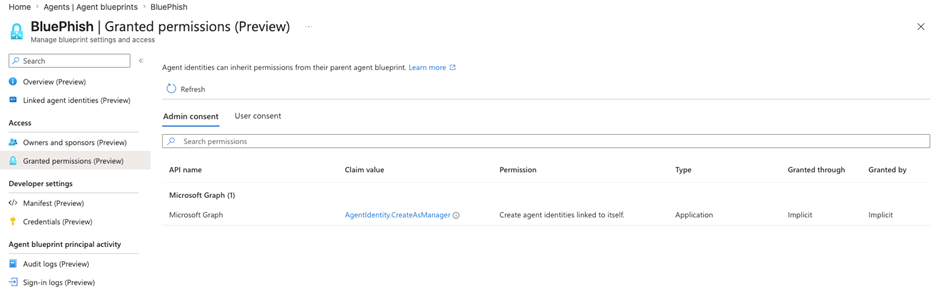
Figure 8: AgentIdentity.CreateAsManager implicit permission
Create Agent Identities
The attacker can use the blueprint principal in the victim tenant to create agent identities by authenticating with the blueprint credentials from its home tenant.
Step 1 - Authenticate against victim tenant as the blueprint
The attacker requests a client credentials token against the victim tenant’s token endpoint. POST https://login.microsoftonline.com/{tenant_victim_id}/oauth2/v2.0/tokenContent-Type: application/x-www-form-urlencoded
client_id={blueprint_id}&client_secret={blueprint_secret}&scope=https://graph.microsoft.com/.default&grant_type=client_credentials
The response is an access token (roles include AgentIdentity.CreateAsManager) which can be used to create a local agent identities. A snippet of JWT properties:
{
"app_displayname": "BluePhish",
"appid": "{blueprint_app_id}",
"appidacr": "1",
"idp": "https://sts.windows.net/{victim_tenant_id}/“,
"idtyp": "app",
"roles": [
"AgentIdentity.CreateAsManager"
"wids": [
"0997a1d0-0d1d-4acb-b408-d5ca73121e90 "
}
Step 2 - Use token to create a new agent identity
This token is presented as the bearer token to create an agent identity in the victim’s tenant, derived from the agent blueprint.
POST https://graph.microsoft.com/v1.0 /servicePrincipals/Microsoft.Graph.AgentIdentityAuthorization: Bearer {access_token_from_step_1}OData-Version: 4.0Content-Type: application/json{ "displayName": "{agent_identity_name}", "agentIdentityBlueprintId": "{blueprint_id}", "sponsors@odata.bind": [ "https://graph.microsoft.com/v1.0/users/{sponsor_victim_user}" ]}
A sponsor ID is the object ID of a user from the victim tenant, is required in order to create an agent identity. The sponsor is a governance requirement intended for a person to be accountable for an agent identity, however can be removed once the identity has been provisioned.
Token Acquisition & Profit
Once an agent identity is established in the victim tenant and permissions granted, the attacker has everything required.
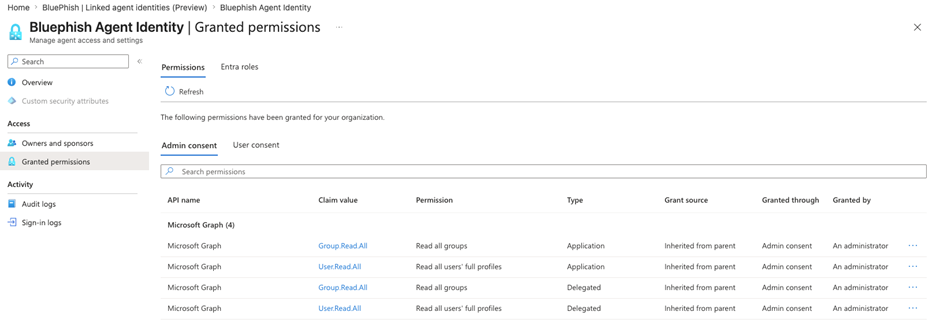
Figure 9: Agent identity in victim tenant with inherited permissions
Using the client credentials defined on the blueprint (in the attacker's tenant), the attacker can obtain a token for the agent identity in the victim’s tenant using the autonomous agent app flow:
Step 1: The agent identity blueprint presents the credentials and fmi_path (client ID of the target agent identity) and receives an exchange token.
Step 2: Exchange the resulting token for a Microsoft Graph access token
This yields a valid token for the agent identity, allowing the attacker to act with its assigned permissions in the victim tenant.
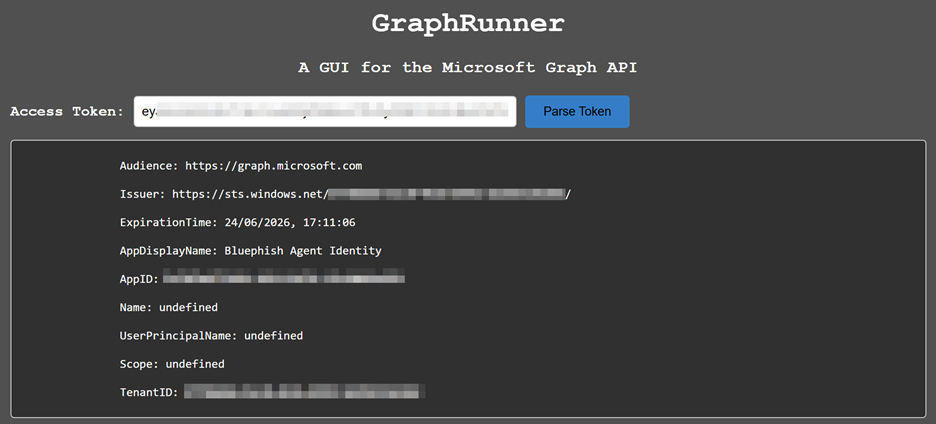
Figure 10: “Bluephish” agent identity token imported into GraphRunner
As seen in Figure 9 , the agent identity has the application permissions for User.Read.All and Group.Read.All. These can be used with a post-access tool such as GraphRunner, to run arbitrary graph requests.
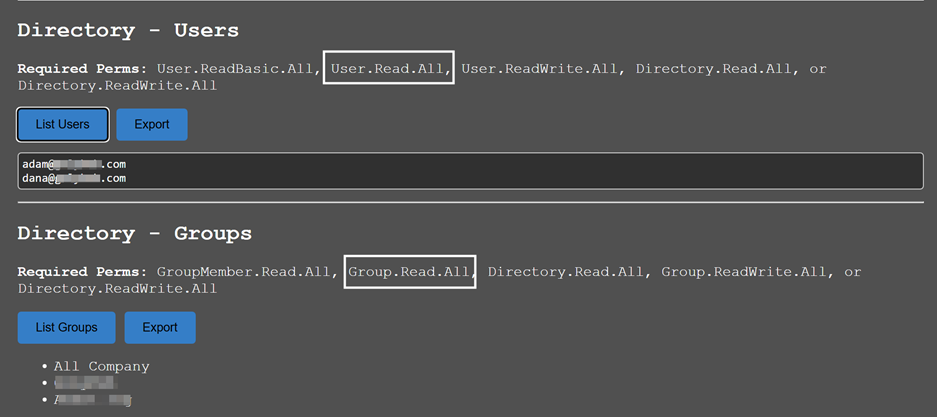 Figure 11: Example of arbitrary graph requests with agent identity token
Impact and Mitigations
How does BluePhishing expand traditional app consent phishing?
| Lower user awareness | Users may be more likely to consent to AI agents than traditional apps due to lack of user awareness around the attack vector. |
| Less governance than apps | Agent consent controls are less mature and deployed less widely compared to app consent controls. |
| Increased blast radius | An app registration maps to a single service principal per tenant, whereas 250 agent identities can be derived from a single blueprint. |
| Inherited scopes not visible | According to Microsoft’s documentation, inherited permissions are not visible in the Entra portal or via Microsoft Graph, limiting the ability to audit agent identities permissions. During testing, silent inheritance of permissions from the blueprint principal to the agent identity was only observed for delegated permissions (i.e., those granted through user consent), limiting the ability to audit permissions of agent identities. |
| Activity blends in with legitimate agent usage | Where apps with offline access may arouse suspicion, agents are expected to act autonomously, and many environments already contain large numbers of agent identities. |
Mitigations
Organizations should raise user awareness of the risks associated with agent consent, particularly when granting permissions to ‘third-party’ agents from untrusted sources . Much like user consent settings limit users from granting consent to third party apps, these settings also extend to agent blueprints and their agent identities.
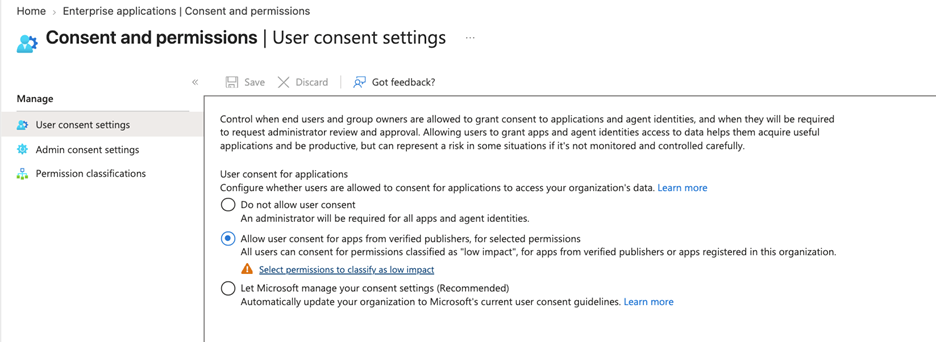
Figure 12: User consent settings within Enterprise app > Consent and permissions
For more granular control, ‘Permission classifications’ define which permissions users can approve , with Microsoft already blocking high‑risk Graph permissions such as User.ReadWrite.All for agents .
Detection and Response
The agent blueprint ID is consistent across all tenants that consent to it, providing a common indicator to detect or remove known malicious agents.
Applying the principle of least privilege will limit the impact of an agent compromise, utilizing controls such as Conditional Access policies for agents and Entra ID protection for agents. For monitoring, agent and blueprint events are surfaced in the audit log, in a similar way to app consent operations.
For example
- Create an agent identity blueprint → Add application
- Create an agent identity → Add service principal
Conclusion
BluePhishing can be considered the next iteration of app consent phishing, inheriting many of its advantages. Like app consent phishing, it leverages legitimate, user-consented identities, allowing attackers to operate within trusted contexts. However, the agent identity framework provides distinct advantages.
Awareness of this emerging attack vector remains low, and users may be more willing to authorize AI agents without fully considering the security implications. While requests for broad application permissions can raise suspicion, autonomous behavior is a defining characteristic of agents and is therefore more readily accepted, particularly with environments already containing large numbers of agent identities.
Finally, the potential impact of compromise can be greater: a single blueprint can create up to 250 agent identities enabling compromise at scale. This dedicated agent identity framework also establishes a new paradigm for AI-driven post-exploitation, extending attacker capabilities beyond those enabled by traditional app consent phishing.