
Key Takeaways
- Mailbox rules are a high-risk post-exploitation tactic. Attackers abuse native mailbox rules for exfiltration, persistence, and communication manipulation. Combined with third-party services and domain spoofing, attackers can hijack threads, impersonate victims, and manipulate vendor communications, all without network-level interception.
- It's more common than you think. Approximately 10% of compromised accounts in Q4 2025 had malicious mailbox rules created shortly after initial access.
- Attackers use recognizable patterns. Malicious rules overwhelmingly use minimal, nonsensical names (., ..., ;) and favor actions like deleting messages, or moving them to rarely checked folders like Archive or RSS Subscriptions. Attackers are being lazy, confident they won't be detected, they put little thought into rule names, opting for quick, throwaway characters instead.
- Persistence survives password resets. Forwarding and suppression rules remain active after credential changes, allowing continued data leakage as long as the rule exists.
Introduction
When was the last time you checked your mailbox rules?
In Microsoft 365 environments, attackers typically gain initial access through credential phishing, password spraying, brute-force, or OAuth consent abuse.
Once inside, adversaries focus on persistence and stealth rather than immediate disruption. Instead of deploying malware or C2 infrastructure, they abuse native platform features to operate undetected under the compromised identity.
One especially effective technique for maintaining persistence is creating malicious mailbox rules. While mailbox rules are designed to help users organize email, attackers leverage them to delete, hide, forward, or mark messages as read, silently controlling email flow without alerting the victim.
Why Attackers Abuse Mailbox Rules
Mailbox rules provide stealth, automation, and persistence using built-in M365 functionality, enabling several attacker objectives:
Covert Data Exfiltration:
Attackers create forwarding or redirection rules to automatically send copies of emails to external, attacker-controlled mailboxes, often using specific keywords ("invoice", "wire", "contract") or senders to collect high-value data while minimizing noise. Alternatively, emails are moved to obscure folders (Archive, RSS Feeds, or hidden folders) for periodic review without triggering forwarding indicators.
Victim Deception and Email Suppression:
Rules that delete, mark as read, or relocate messages hide security alerts, password reset emails, MFA notifications, suspicious replies, and third-party service registrations that could expose attacker activity. This manipulates the victim's perception of their own mailbox, buying attackers time to deepen their foothold or complete fraudulent operations.
Persistence Without Malware:
Auto-forwarding rules maintain visibility into a mailbox even after password changes. As long as the rule persists, information continues to leak, and creating a cloud-native persistence mechanism.
Man-in-the-Middle-Like Behavior:
By routing specific correspondence to hidden folders, attackers position themselves within communication channels to:
- Intercept messages from vendors, partners, or clients before the victim sees them.
- Impersonate the mailbox owner or inject themselves into existing message threads.
- Suppress replies and notifications revealing fraudulent activity.
- Control the narrative by selectively showing or hiding messages to both parties.
Unlike traditional MITM attacks requiring network positioning, this achieves similar outcomes using legitimate platform features. The victim communicates normally, unaware that high-value conversations are being silently intercepted and manipulated, giving attackers significant tactical advantage with a low detection profile.
Malicious Rule Creation Statistics
Analysis of compromised accounts consistently shows that mailbox rule abuse is not an edge case, but a frequent post-exploitation activity. During Q4 2025 approximately 10% of compromised user accounts had at least one malicious mailbox rule created shortly after initial access. The minimal time of mail rules creation after an ATO is around 5 seconds.
Most Common Rule Names Observed:
Attackers rarely use descriptive or human-readable names for malicious rules. Instead, they favor short, generic, or visually inconspicuous strings. This happens because attackers are often overconfident they won't be detected, allowing themselves to be lazy.
The most frequently observed rule names were:
- ‘.’ (16%)
- ‘...’ (8.5%)
- ‘..’ (8%)
- ‘;’ (6%)
- ‘;;;’ (4%)
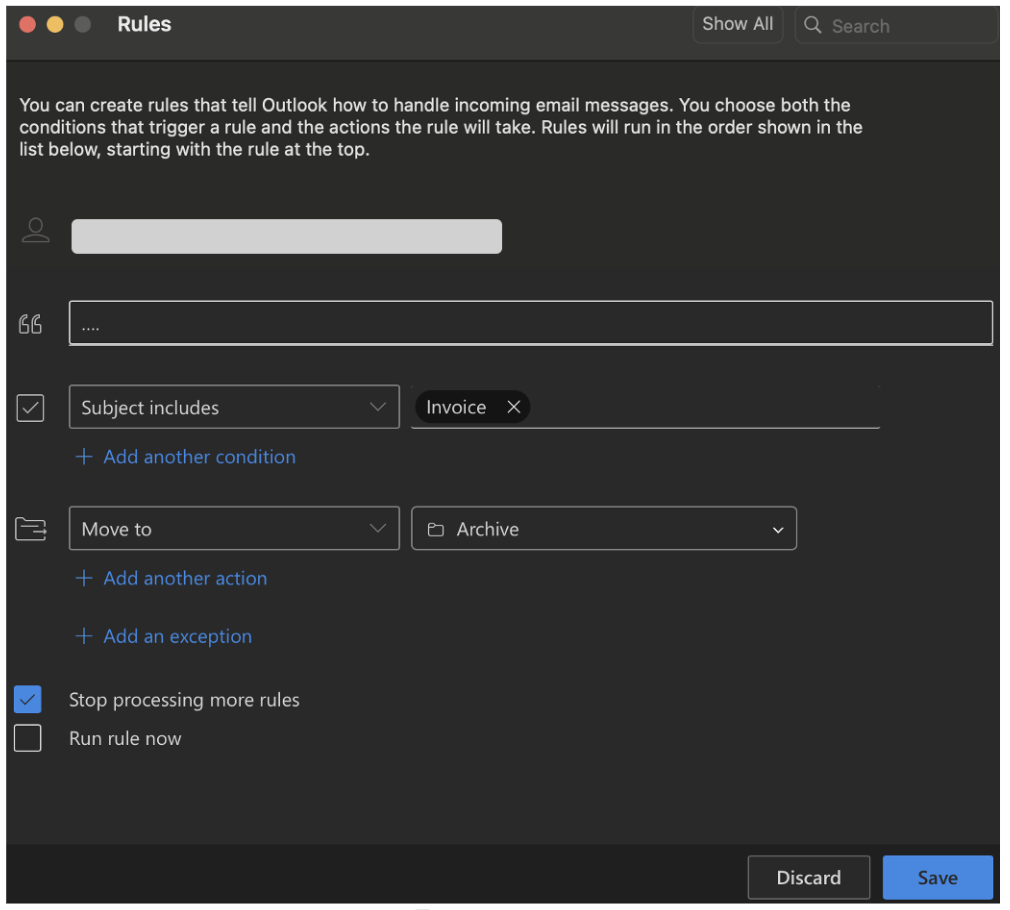
Figure 1: Rule creation example in Microsoft Outlook.
Most Common Rule Actions:
The most commonly observed actions in mailbox rule creation include:
- Delete messages from certain senders or containing certain words.
- Move messages to ‘Conversation History’ folder
- Move messages to ‘Archive’ folder
Why Attackers Use Minimal or Nonsensical Rule Names:
Low Effort, Low Risk: Attackers are often rushed or overconfident, investing minimal effort into naming convention given mailbox rules have historically low detection rates and are rarely reviewed.
Several factors may explain shared rule naming across different attackers. Public post-exploitation tools, phishing kits, and PhaaS platforms often use hardcoded default names or identical templates when programmatically creating rules across victims and operators. Additionally, BEC guides and code snippets circulated on forums and dark web marketplaces get copied and reused, including rule names. Even without shared tooling, attackers can independently arrive at similar names driven by the same minimal-effort logic.
Example Scenarios
Payroll Fraud
The following scenario illustrates how attackers combine mailbox rule abuse with internal phishing to execute a targeted payroll fraud attempt, while remaining largely invisible to the affected users.
Initial Compromise and Rule Creation
In this incident, the first compromised account belonged to a user with the title ‘Accounting Specialist’. Shortly after access was obtained, the attacker created a mailbox rule named ‘...’. Its logic was simple: Any email with the subject containing “FW: Payment Receipt” was automatically moved to the Archive folder. This subject line would later be used in the attacker's internal phishing campaign, with the rule designed specifically to suppress any warning replies or suspicious activity reports about that phishing email.
Internal Phishing:
With control over the first mailbox, the attacker launched an internal phishing campaign targeting 45 additional users within the same organization using the subject "FW: Payment Receipt". The phishing email was deliberately minimal:
- The email body was empty
- An attachment was included
- The sender’s email signature had been subtly modified
Because the email originated from a legitimate internal account and used a familiar signature, it bypassed many user suspicion checks and traditional email security controls.
Secondary Compromise:
Among the recipients was the Assistant to the CEO, a role with visibility into sensitive business and payroll-related communications. After opening the phishing attachment, this second account was also compromised. As with the first account, the attacker immediately established post-exploitation control by creating a mailbox rule again named ‘...’. This rule moved any email with the subject containing “Payroll enrollment” to the Archive folder, effectively suppressing payroll-related visibility for the victim.
An email with the subject “Payroll enrollment” was sent from the compromised Assistant to the CEO account to the company’s payroll specialist. The message attempted to initiate a fraudulent payroll-related action. At this stage, mailbox rules played a critical role in the attack’s success. They ensured that:
- Replies or clarification requests were hidden
- Security alerts were suppressed
- Victims remained unaware of ongoing misuse of their accounts
The entire attack chain operated within Microsoft 365 using legitimate functionality, demonstrating why mailbox rules must be treated as a high-risk post-exploitation signal rather than a benign productivity feature.
Email Hijacking and Thread Manipulation
The following scenario demonstrates how attackers use mailbox rules in combination with third-party email services to create a man-in-the-middle-like environment entirely within email communications, enabling sophisticated business email compromise (BEC) without requiring persistent account access.
Initial Compromise and Suppression Rule
After the initial user account was compromised, the attacker created a malicious mailbox rule named '....'. The rule's logic targeted a specific email service: any email with a 'From' address containing the word 'zoho' was automatically moved to the 'RSS Subscriptions' folder. This folder, typically used for automated feed updates, is rarely checked by users, making it an ideal location for hiding attacker-controlled correspondence.
Abusing Third-Party Email Services for Infrastructure
Zoho offers a service that allows businesses to register custom email domains and create professional email addresses. The attacker leveraged the compromised user's business email to register for this service, creating a custom email account under the attacker's control. Because the mailbox rule was already in place, all verification emails and correspondence from Zoho were automatically hidden in the 'RSS Subscriptions' folder. The attacker retrieved verification codes and completed account setup without the victim's awareness.
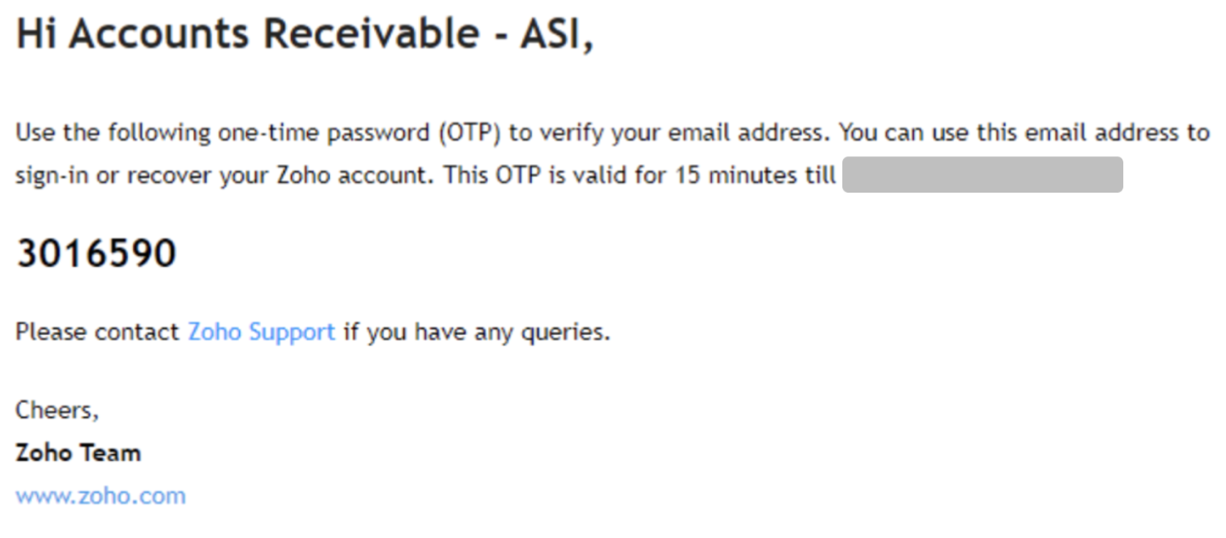
Figure 2: Zoho Verification Code.
Domain Spoofing via Homoglyph Registration
Using the Zoho platform, the attacker registered a domain employing a homoglyph attack to closely mimic the legitimate tenant name. They then created the email account '[user_name]@[tenant_name]0.com' (note the number zero instead of the letter 'O'). They also configured an alias email address using the same spoofed domain structure. These nearly identical addresses were designed to appear legitimate in email threads, especially when viewed quickly or on mobile devices.
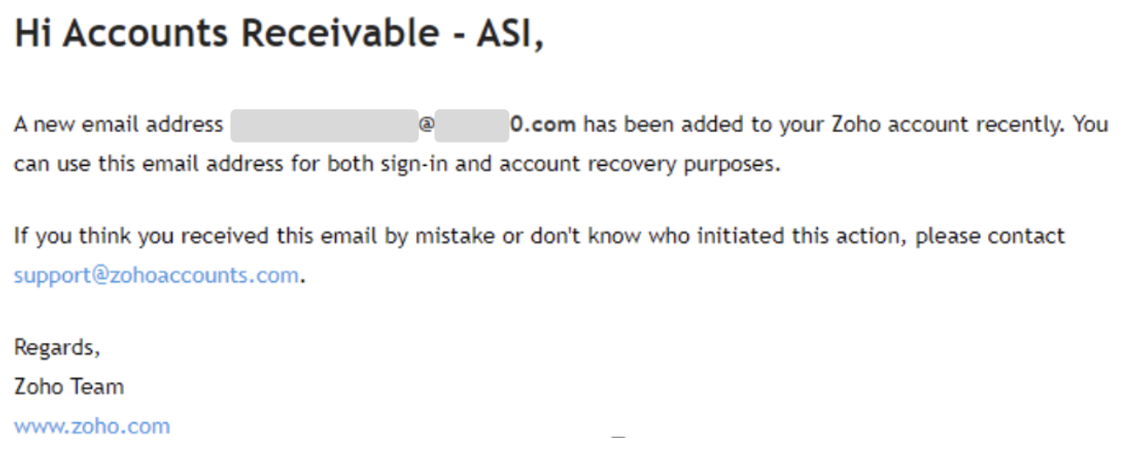
Figure 3: New spoofed email address add to the account.
Thread Hijacking and Fraudulent Communication
The attacker identified an existing payment request thread between the compromised tenant and third-party vendor. Rather than initiating a new conversation, which might raise suspicion, they hijacked the legitimate thread. Using the fake email addresses created via Zoho, the attacker added these spoofed addresses to the CC field, lending false authenticity to the correspondence.
The attacker sent a message inquiring about the status of a transaction. The vendor replied stating that the transaction had already been completed approximately one week prior. At this point, the attacker lost access to the compromised tenant account a few days later, after it was suspended and the password was changed following our alert to the customer.
Presumed Attack Continuation and Persistent Risk
Based on the established infrastructure and communication pattern, the primary assumption is that the attacker's plan was to claim that funds were never received and request a duplicate payment to the attacker-controlled account. Although access to the original mailbox was lost, the fake Zoho-based email address likely remains active. This creates a persistent risk: the attacker may continue the scam independently from the external spoofed account, leveraging the hijacked email thread's perceived legitimacy and the vendor's prior engagement.
This scenario illustrates a form of email-based man-in-the-middle activity conducted entirely within the application layer, where mailbox rules suppress detection, third-party platforms provide infrastructure, and thread hijacking establishes social proof, all without requiring continuous access to the compromised environment.
University Account Takeover and Mass Spam Operations
The following scenario illustrates a distinctly different attacker motivation and operational pattern. Unlike targeted business email compromise, where stealth and precision are paramount, university account compromises often involve complete mailbox takeover with little regard for detection, prioritizing volume and speed over sophistication.
Unconditional Mailbox Isolation
In university environments, compromised accounts frequently exhibit mailbox rules with a defining characteristic: they are unconditional. Rather than targeting specific senders, keywords, or subject lines, these rules apply blanket actions to all incoming email. The most common configurations observed include:
- Delete all incoming messages
- Move all incoming messages to obscure folders (e.g., Archive, RSS Subscriptions, Deleted Items)
- Mark all incoming messages as read and move them out of the Inbox
The purpose is not selective suppression of security alerts or vendor communications. Instead, the goal is total mailbox isolation, completely severing the legitimate user's ability to receive any email whatsoever.
Operational Objectives: Mass Spam Distribution
Unlike BEC attackers, who craft narrowly scoped rules to intercept only emails from impersonated vendors or replies to specific phishing threads, university account attackers prioritize mass email distribution. Once the mailbox is isolated:
- The attacker gains unrestricted control over outbound communications.
- The legitimate user is unaware of incoming warnings, bounce-backs, or abuse reports.
- The compromised account is used to send high-volume spam or phishing campaigns, often targeting other students, faculty, or external contacts.
This approach sacrifices stealth for operational efficiency. Attackers are aware that the account will likely be detected and disabled, but the short window of access is sufficient to distribute thousands of malicious emails before institutional security teams respond.
Common Fraud Schemes Targeting University Communities
University environments are particularly vulnerable to specific fraud schemes that exploit the academic community's characteristics. Attackers commonly distribute fake job postings targeting students seeking internships or part-time work, scholarship scams requesting upfront fees or personal information, and fraudulent marketplace listings advertising electronics, textbooks, or other items at suspiciously low prices. These schemes are effective because they align with legitimate student needs and often circulate during high-activity periods like semester start dates or graduation season. The compromised institutional email address lends false credibility to these scams, as recipients are conditioned to trust communications originating from .edu domains.
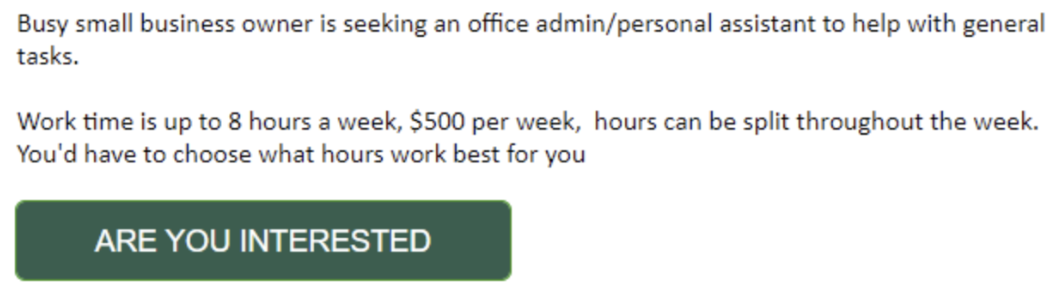
Figure 4: University fake job scam example.
Targeting Dormant and Abandoned Accounts
While active student and faculty accounts are frequently compromised, attackers also target dormant accounts, those belonging to former students, retired faculty, or staff who have left the institution, but whose accounts were never properly deactivated. These accounts present an attractive target for several reasons:
- Weaker security posture: Dormant accounts often predate current security policies, lacking MFA enforcement, modern password requirements, or conditional access protections that have since been implemented for active users.
- Absence of monitoring: Security teams typically focus monitoring efforts on active accounts where user behavior can be baselined. Dormant accounts generate no legitimate activity, meaning any authentication or mailbox rule creation may go entirely unnoticed.
- Delayed detection: Because no legitimate user is actively checking these mailboxes, there is no one to notice suspicious emails, password reset notifications, or warning messages. Attackers can operate from these accounts for weeks or months before discovery.
Why Universities Are Targeted for This Tactic
Several factors make university environments attractive for mass spam operations:
- Large contact lists with trusted relationships across academic and administrative networks.
- Institutional email addresses carry inherent legitimacy, improving phishing success rates.
- Historically lower security posture compared to enterprise environments, including weaker MFA adoption and limited mailbox rule monitoring.
- High user turnover and decentralized IT management can delay detection and response.
Organizations should recognize that mailbox rule abuse is not a monolithic technique. Detection and response strategies must account for both sophisticated, low-and-slow BEC operations and aggressive, high-volume spam campaigns, each exhibiting distinct behavioral patterns in rule creation and usage.
Attacker Automation and Tools
Mailbox rules do require manual but not time-intensive effort from attackers. In practice, the creation of malicious mailbox rules across multiple compromised accounts can be fully automated, allowing attackers to scale their operations from individual targets to enterprise-wide campaigns with minimal effort.
The Reality of Bulk Rule Deployment
Attackers used to manually create each rule for each compromised account. Modern attack frameworks leverage Microsoft Graph API, Exchange Online PowerShell, and direct API calls to programmatically create, modify, or delete mailbox rules across dozens or hundreds of accounts simultaneously. Once an attacker has obtained valid session tokens or credentials, the technical barrier to mass rule deployment is extremely low.
This automation capability transforms mailbox rule abuse from a targeted, precision technique into a scalable, repeatable attack pattern. A single attacker with basic scripting knowledge can compromise multiple accounts through phishing and immediately establish persistence mechanisms across all of them within minutes.
ATOLS: Demonstrating the Ease of Automation
To demonstrate the potential risks and ease of how accessible and dangerous this automation capability has become, Proofpoint researchers created ATOLS (Account Take Over Live Simulation) a fully functional tool that demonstrates the simplicity with which attackers can execute these operations at scale.
ATOLS operates through the following workflow:
- Phishing Infrastructure Setup: Via VPN for anonymity, ATOLS generates a phishing URL (with the help of an external phishing kit) that mimics legitimate Microsoft 365 login pages.
- Session Token Theft: The phishing link is delivered to target users via email or through compromised third-party applications (3PA). Rather than simply capturing username and password combinations, the reverse proxy captures the session cookie/token generated after successful authentication. ATOLS uses the captured session cookie. This cookie provides immediate, authenticated access to the user's Microsoft 365 environment without triggering additional MFA challenges.
- Automated Malicious Actions: Once the session token is obtained, ATOLS automatically creates a malicious mailbox rule with a name and logic specified by the operator.
- Post-Exploitation: ATOLS can optionally perform additional post-exploitation actions such as enumerating contacts, accessing SharePoint, or pivoting to other connected services.
Mitigation
Preventive Controls
Strong preventive measures significantly reduce both the likelihood and impact of mailbox rule abuse:
- Disable External Auto-Forwarding: Block automatic forwarding to external addresses in Exchange Online by default, disrupting one of the most common exfiltration and persistence mechanisms.
- Enforce Conditional Access Policies: Require MFA, restrict access by device compliance and location, limit legacy authentication, and apply risk-based controls to reduce phishing, password spraying, and token replay success.
- Monitor OAuth Grants and Consent Changes: Track new OAuth app registrations, consent grants, and permission changes, especially involving Mail.Read, Mail.ReadWrite, or offline_access scopes, to detect persistent passwordless access.
Incident Response Steps
When malicious mailbox rules are identified, focus on containment, eradication, and access revocation:
- Remove Malicious Rules: Delete all unauthorized inbox rules and verify no additional hidden or conditional rules remain.
- Revoke Sessions and Reset Tokens: Invalidate active sessions and refresh tokens to eliminate persistent access that survives password changes.
- Review Sign-In Activity: Analyze Entra ID logs for suspicious IPs, unfamiliar user agents, anomalous locations, or risky authentication events preceding rule creation.
- Audit OAuth Applications: Remove unrecognized or overly permissive apps with mailbox access and revalidate consent for legitimate ones.
These steps should be treated as mandatory, even if mailbox rules appear to be the only visible indicator of compromise.
[Disclaimer]
Third‑party product names, logos, and brands are the property of their respective owners. References to third‑party services (e.g., Microsoft 365/Outlook, Zoho Mail) are for identification only and do not imply endorsement or affiliation.