
On November 12, a global Microsoft outage left many organizations without email for almost 24 hours. Proofpoint® Enterprise Continuity keeps people sending and receiving through any browser when Microsoft 365 is down, with no failover to trigger, and Continuity Plus adds internal email. More than 41,000 enterprise and MSP customers used Proofpoint continuity services during the outage. To add Continuity or Continuity Plus, contact your Proofpoint account team or partner.
What happened
The outage took Outlook, Teams, and SharePoint offline. People couldn’t reach customers, respond to colleagues, or even see the messages that tell them something is wrong. No service level agreement keeps email running when the service itself is down, and waiting for a provider to recover is not a continuity plan.
Proofpoint Enterprise Continuity: an always-on safety net for your email
Enterprise Continuity keeps your people sending and receiving external email when Microsoft 365, Exchange or Google goes down. With Continuity Plus, internal email keeps flowing too. Once configured, it requires no failover action from users or IT.
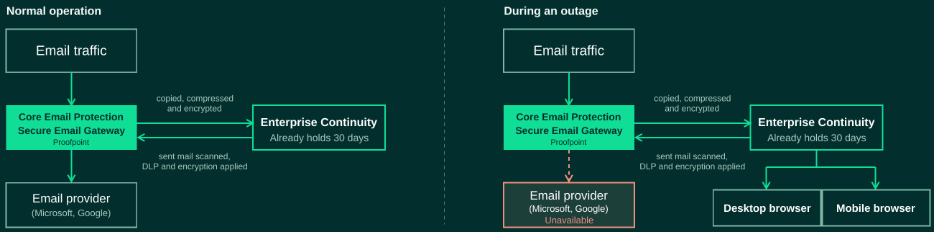
Here’s how it works. Core Email Protection sits in your mail path as a gateway and scans every message bound for your primary email service. Each message is copied, compressed, encrypted, and transmitted to Enterprise Continuity. Because the gateway sits outside Microsoft, it keeps working when Microsoft doesn’t. API-only approaches depend on the platform that failed. During an outage, people send and receive through the web client in any desktop or mobile browser. When service returns, messages are automatically routed back to the right Inbox or Sent Items folder.
Four things matter most when the primary email service is down
- Access from any browser. People can open a secure Proofpoint web client on any desktop or mobile browser. There is nothing to install or activate.
- 30 days of email. The most recent 30 days of email (or up to 1 GB, whichever comes first) are in the emergency inbox the moment an outage begins.
- Protection stays on. Mail through Continuity1 stays under your Proofpoint threat protection, DLP, and encryption policies, with visibility into mail flow.
- Always on, no manual failover. Mail is journaled to Continuity continuously, so there is no switch to flip. No plug-ins, no on-premises hardware.
More than 41,000 customers used Proofpoint Continuity during the outage
Between November 12 and 13, more than 41,000 customers across enterprise and MSP businesses used Proofpoint Enterprise Continuity (including Continuity Plus) and Proofpoint 365 Total Protection Email Continuity Service, covering more than 660,000 mailboxes. Across both services, more than 113 million messages were processed. Customers with Continuity Plus also kept internal email flowing, with colleagues emailing each other while Microsoft was down. Here is what that looked like for one customer.
Customer story: a global payroll, tax, and HR company kept email running through the outage
This customer protects its email with Proofpoint but did not have Continuity in place when the outage began. Payroll, tax, and HR work under tight deadlines and depend on email to communicate with employees, clients, and partners.
The company contacted Proofpoint during the outage. Because Proofpoint was already in its mail flow, we enabled Enterprise Continuity. Their users accessed email through the web client, on desktops and phones, throughout the rest of the day while Microsoft services stayed unstable. Threat protection, DLP, and encryption policies applied to that mail the whole time.
What a resilient email infrastructure from Proofpoint includes
Continuity keeps email available during an outage, but a resilient email infrastructure covers more. When your primary platform fails, three functions need a secure, independent path.
1. Human email security, deliverability, and access
Three layers keep people working and their email protected:
- Enterprise Continuity keeps people sending and receiving through any browser during an outage. With Continuity Plus, internal email keeps flowing too.
- Core Email Protection inspects mail at the gateway before it reaches your users, and the API extends coverage to internal mail.
- Email DLP and Encryption applies your data loss prevention and encryption policies to outbound mail, including mail sent from Continuity, helping keep sensitive data protected while your primary platform is down.
2. Machine-generated email: application and AI-generated email
Password resets, invoices, statements, alerts, and authentication codes are business-critical. Many of these messages now come from applications, SaaS platforms, and AI agents. Proofpoint Secure Email Relay secures that traffic and keeps it separate from your user mailboxes.
- Control every sender. Allow only approved applications, SaaS platforms, third parties, and AI agents to send using your domains.
- Authenticate by default. Apply DKIM signing and DMARC alignment across senders to move toward DMARC enforcement faster.
- Scan outbound mail. Check for malicious links, attachments, spam, and malware before delivery.
Customer story: the outage exposed a gap in application email
While Microsoft was down, many of the payroll, tax, and HR company’s customers could still send requests because they use Gmail and other providers. With Continuity1, the company could receive and answer them. But the outage exposed another gap: the same company also routed application email through Microsoft, and that mail stopped too. It is now moving that mail to Proofpoint Secure Email Relay to reduce its dependence on Microsoft.
3. Archive: an independent system of record
Your retention and eDiscovery obligations do not pause when a mailbox platform does. Proofpoint Archive preserves business communications in a cloud-native archive that sits outside your primary email platform.
- Immutable, defensible retention with WORM-compliant preservation and support for SEC 17a-4 and SOC 2 Type II.
- Fast discovery through full-text search, legal hold, and self-service export.
- Regional deployments across the US, Canada and EU to meet data residency requirements.
If one provider carries all three, one outage reaches all three.
How to build email resilience across platforms
Every provider has outages—Microsoft, AWS, and Proofpoint included. What matters is whether your email, your applications, and your records keep working when one happens. That takes a second path, planned before you need it.
Proofpoint builds for this with multiple regions, multiple cloud providers, and graceful degradation that queues mail until a dependency returns. During the October 2025 AWS US-EAST-1 outage, email scanning and threat blocking kept running. We explain how in Where email security meets relentless reliability.
Be ready before the next email outage
Don’t wait for the next outage. Customers who set up email continuity in advance are ready when the next outage arrives.
Enterprise customers: talk to your Proofpoint account team or partner about adding Proofpoint Enterprise Continuity.
MSPs and SMBs: Proofpoint 365 Total Protection Email Continuity Service gives users webmail access to email when the primary email server is unavailable. Activate and configure it in advance and contact your Proofpoint 365 Total Protection representative or partner to get started.
Read the Enterprise Continuity data sheet
Frequently asked questions
What is email continuity?
Email continuity is a service that keeps people sending and receiving email when their primary email platform is unavailable. With Proofpoint Enterprise Continuity, each message bound for your primary service is continuously copied, compressed, and encrypted to a separate service. When service returns, mail routes back to the user’s Inbox or Sent Items folder. This applies to email services from Microsoft and Google.
Does Proofpoint Enterprise Continuity support internal email?
Yes. With a Continuity Plus license, Exchange journals messages to deliver internal mail, so colleagues can keep emailing each other during an email outage.
How do I access email when Microsoft 365 is down?
Proofpoint Enterprise Continuity keeps email available when Microsoft 365 or Exchange goes down. People open a secure Proofpoint web client in any browser, on a desktop, laptop, iOS, or Android device. Nothing needs to be installed or activated, and the most recent 30 days (or 1 GB of data per mailbox, whichever comes first) of email are already in the emergency inbox.
What triggers Proofpoint Enterprise Continuity when Microsoft 365 goes down?
No trigger is needed. Continuity is an always-on service, so there is no email outage threshold to detect. Outages may affect only some users or some regions, making automated triggers unreliable. Your people can use Continuity whenever Microsoft 365 is unavailable to them, whether the disruption is global, regional, or limited to a few users.
How does failover work in Proofpoint Enterprise Continuity?
There is no failover to wait for. Messages are journaled to Continuity continuously, from Proofpoint and from Exchange, covering internal and outbound mail. Exchange journaling also includes inbound mail, and Continuity removes the duplicates. When an outage starts, the mail is already there.
Can people use Proofpoint Enterprise Continuity on their phones?
Yes. They can access Enterprise Continuity through a browser on their mobile device, with no app to install. The web portal is optimized for iOS Safari and the Android native browser.
How is data secured in Proofpoint Enterprise Continuity?
Continuity encrypts message data at rest using AES-256-CTR in both the database and the file system. Each customer automatically receives a unique encryption key pair. The keys are stored separately from the Continuity service in the Proofpoint Key Service.
[1]Internal email delivery requires a Continuity Plus license.