Key Takeaways
An AI acceptable use policy is the rulebook employees follow: approved tools, permitted and prohibited uses, data limits, and review requirements. AI governance is the broader program behind it.
A policy limited to chatbots is incomplete. It should also cover SaaS-embedded AI, browser extensions, developer assistants, and shadow AI.
Sensitive data rules work best when tied to specific tools and data categories, such as prohibited, restricted, or approved, rather than a blanket ban.
Enforcement should be risk-based. Depending on the tool, user, and data, a control can allow, warn, redact, block, or escalate.
Agents need rules beyond prompts: approved tasks, distinct identities, limited tool access, and approval gates. An agent can use valid permissions in ways the user never intended.
What is an AI acceptable use policy?
An AI acceptable use policy is a formal set of workplace rules governing how authorized people use artificial intelligence. It identifies permitted tools and tasks, sets limits on data sharing and automated actions, assigns accountability for AI-generated output, and explains how the organization reviews and enforces the rules.
Employees already use generative AI in browsers, Microsoft 365, SaaS applications, and connected agent workflows, often in tools IT did not deploy. A clear policy answers three practical questions: which tools are approved, what information can go into them, and who reviews the output. The goal is to make responsible AI use practical, not to stop useful innovation. The policy should cover every kind of AI employees encounter. Written rules are only the starting point. Employee guidance and technical controls are what make them work in daily operations.
AI acceptable use policy vs. AI governance policy
An AI acceptable use policy is one part of AI governance. Governance decides which vendors, models, and risks the organization accepts, and it covers privacy, compliance, system oversight, and accountability. The acceptable use policy turns those decisions into day-to-day expectations for users and teams. An AI security policy covers a different question: how the organization protects AI systems, data, and agents. The table compares the four terms readers most often confuse.
Term
Primary question it answers
Typically owned by
AI acceptable use policy
What may employees do with AI, and under what rules?
Security, IT, HR
AI policy
What are the organization's overall written rules for AI?
Governance or legal
AI governance policy
Which vendors, models, and risks does the organization accept?
AI governance board or CISO
AI security policy
How does the organization protect AI systems, data, and agents?
Security
Term
AI acceptable use policy
Primary question it answers
What may employees do with AI, and under what rules?
Typically owned by
Security, IT, HR
Term
AI policy
Primary question it answers
What are the organization's overall written rules for AI?
Typically owned by
Governance or legal
Term
AI governance policy
Primary question it answers
Which vendors, models, and risks does the organization accept?
Typically owned by
AI governance board or CISO
Term
AI security policy
Primary question it answers
How does the organization protect AI systems, data, and agents?
Typically owned by
Security
What should an AI acceptable use policy include?
An effective AI acceptable use policy covers the components below. Each one answers a question that employees and security teams would otherwise answer inconsistently on their own.
- Purpose and scope: State why the policy exists, who must comply, and which AI it covers, including third-party services, enterprise AI, APIs, local models, and agents.
- Approved tools and access: List permitted vendors, applications, accounts, and integrations, and define how a new tool is reviewed and approved. Include AI features built into Microsoft 365 and other SaaS applications, and the data each one can reach.
- Permitted use cases: Give concrete examples, such as summarizing approved material, drafting routine communications, knowledge search, and coding assistance under agreed safeguards.
- Restricted and prohibited use cases: Prohibit unapproved data transfers, attempts to bypass controls, deceptive content, and autonomous high-impact decisions without required review.
- Sensitive data rules: State which data may be used with which tools.
- Human review and accountability: Require users to check AI output for accuracy, appropriateness, confidentiality, and security, and assign responsibility for decisions and published work.
- Agent and connector rules: Define approved agent tasks, human ownership, tool access, and approval gates, as covered in the agents section below.
- Security and compliance requirements: Specify logging and retention rules, access controls, and the legal or regulatory review your AI compliance obligations require.
- Monitoring, enforcement, and consequences: Explain what activity may be monitored, how the organization responds to violations, and what consequences apply.
- Exceptions and approvals: Name an owner, review criteria, documentation, and a renewal date for new tools, integrations, and higher-risk uses.
- Training and updates: Include onboarding, employee acknowledgment, periodic training, and scheduled reviews as AI capabilities and business needs change.
Who should follow the policy
The policy applies to employees, contractors, and other authorized users who interact with company information or systems. Third-party providers and AI agents may need additional requirements, and the policy should say so. Because an agent cannot acknowledge a policy, the policy should name a human owner who is accountable for each approved agent.
Data rules to define
Make data classifications operational. For each data category (e.g., regulated data, credentials, source code, confidential business information), state whether it is prohibited, restricted, or approved for each class of tool. A simple matrix works: data categories down one side, tool classes across the other.
Sample data matrix
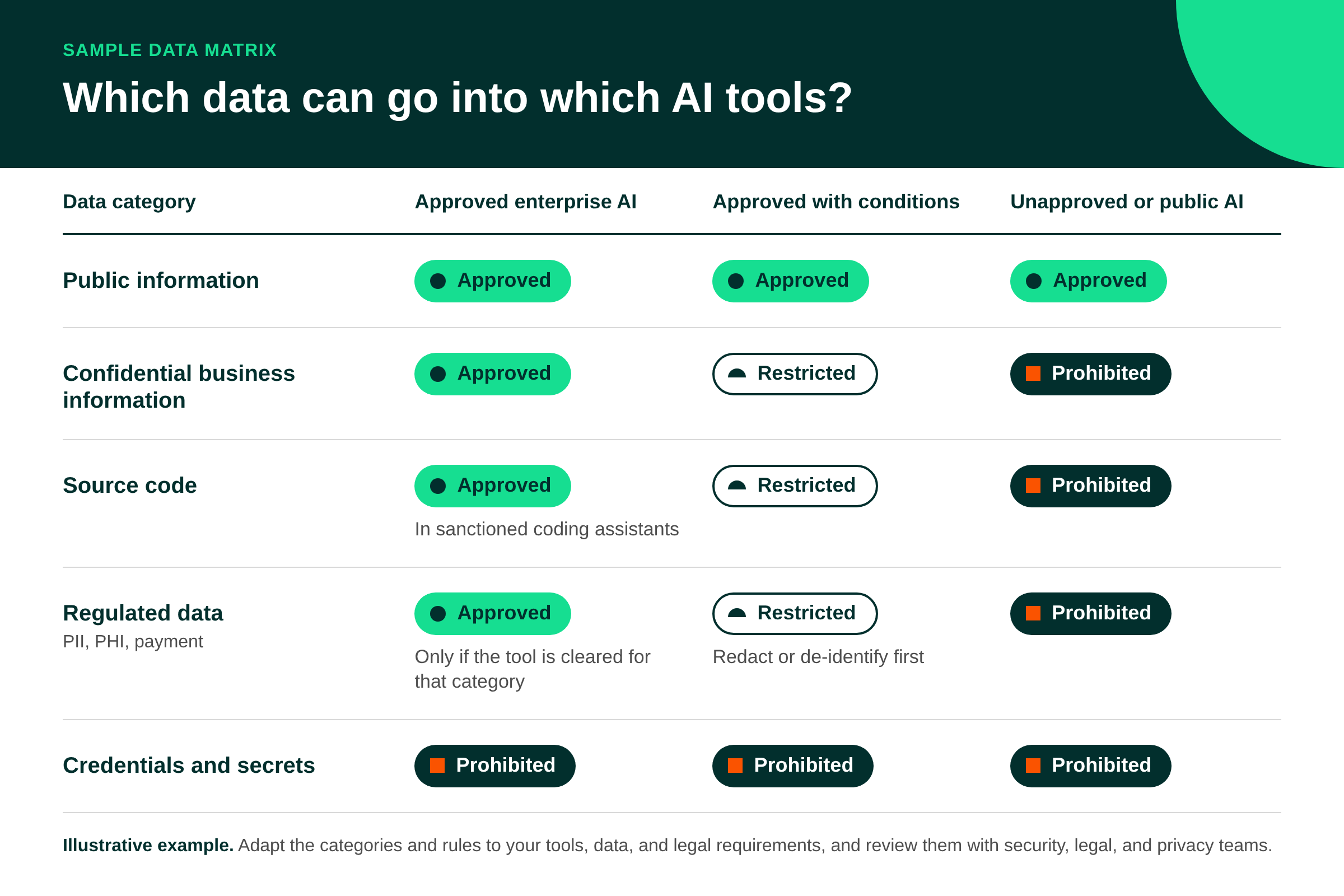
Approving a tool does not make every use of it safe, so allowed data should still depend on the tool’s controls, contractual terms, and purpose. Apply the rules to everything users can put in or get out: prompt text, attached files, screenshots, generated output, and information retrieved through connectors. State when redaction or de-identification is required, and when a workflow needs a separate data protection review.
Exception handling
Tell employees how to request an exception and whom to contact for support. The exception path matters most when real work needs something outside the sanctioned list.
For example, a developer using an approved AI coding assistant needs rules for sharing proprietary code, removing embedded credentials, and reviewing generated code before production use. If the project calls for a tool outside the sanctioned list, the policy should name the approval path and who owns the decision.
Align the policy with recognized frameworks
Map policy sections to the frameworks your organization already follows, such as the NIST AI Risk Management Framework, ISO/IEC 42001, or the EU AI Act where it applies, and confirm the mapping with legal and compliance teams. Reusing existing control language keeps the policy consistent with audits and reviews you already run.
Questions every AI acceptable use policy must answer
Employees already use generative AI to write, research, code, and work with business information, including in tools IT did not deploy. These tools now appear in browsers, Microsoft 365, SaaS applications, and connected agent workflows. The questions they raise are practical: which tools are approved, what information can go into them, and who reviews the output.
An AI use policy that answers those questions in plain language is the foundation of safe AI adoption. The goal is to make responsible AI use practical, not to stop useful innovation.
Why enterprises need an AI acceptable use policy
A standard IT acceptable use policy usually does not address AI prompts, model inputs, generated answers, or agents that act across systems. An AI-specific policy closes that gap in three areas where AI differs from other workplace technology.
AI appears in tools IT did not deploy
Shadow AI arises when employees use AI without organizational approval or visibility, from public chatbots to Microsoft Copilot and AI features built into SaaS products. A policy that only says no leaves employees without an approved alternative, which is how unsanctioned use starts.
The prompt is the exposure
A single prompt or file upload can carry customer records, regulated data, or intellectual property outside the organization. Rules should be specific to tools and data categories rather than a blanket ban.
Agents act, not just answer
Agents may retrieve documents, invoke application functions, or work through connected services. The policy must say which tools an agent can call, what information it can access, and which actions require a person’s approval.
Build auditability into the policy
Define which records to retain so the organization can explain AI-related decisions and investigate violations. Useful audit trails record the user or agent, the tool, the data classification, the requested action, the control decision, and the outcome, with a timestamp. Reviewing them also shows where rules are too strict or too loose. Align retention and access with applicable policies and legal requirements.
How to make an AI acceptable use policy enforceable
To enforce an AI acceptable use policy, discover where AI is used, classify tools and data by risk, apply controls that match the risk, and review the results. A published policy does not show whether employees follow it. An AI security program provides that visibility and control while helping people understand their options. Whenever possible, offer a compliant path so employees can do their work safely. Use this five-step process to make enforcement repeatable:
- Discover AI use across people, applications, and agents.
- Classify tools, workflows, and sensitive data by risk.
- Define specific rules, owners, and approved exceptions.
- Apply controls that allow, log, warn, redact, block, or escalate.
- Monitor results, review audit trails, and improve the policy.
Discover AI use before setting controls
Build an inventory of the AI services, embedded features, agents, and Model Context Protocol (MCP) servers in use across the organization. Identify owners, users, connected applications, and data flows. Include shadow AI discovery so the policy reflects actual work, not only centrally purchased tools.
Classify tools and data, then define the rules
Classify each tool, workflow, and data category by risk, then write specific rules, assign owners, and document approved exceptions so every control traces back to a decision.
Match the response to the risk
Classify each interaction by tool approval, user role, data sensitivity, and requested action, then match the response to the risk (see table for examples).
Situation
Example
Typical response
Approved tool, low-risk content
Summarizing public webinar notes
Allow and log
Accidental low-risk attempt
Using an unapproved writing tool for a routine draft
Warn and point to an approved alternative
Sensitive data in an unapproved tool
Pasting customer PII into an unapproved assistant
Redact or block, and escalate if the transfer is prohibited
High-impact agent action
An agent sending sensitive files outside the organization
Require human approval or block
Situation
Approved tool, low-risk content
Example
Summarizing public webinar notes
Typical response
Allow and log
Situation
Accidental low-risk attempt
Example
Using an unapproved writing tool for a routine draft
Typical response
Warn and point to an approved alternative
Situation
Sensitive data in an unapproved tool
Example
Pasting customer PII into an unapproved assistant
Typical response
Redact or block, and escalate if the transfer is prohibited
Situation
High-impact agent action
Example
An agent sending sensitive files outside the organization
Typical response
Require human approval or block
How should the policy address AI agents and connected tools?
An AI acceptable use policy should address agents and other agentic AI directly, because an agent plans steps, calls tools, and takes actions across systems instead of just answering a prompt. Permissions alone are not enough. An agent can use valid access for an action the user never intended, a risk known as semantic privilege escalation.
How an AI agent policy differs from a traditional AI tool policy
A traditional AI tool policy governs what users submit to an application. An agent policy extends that to the identities, tool calls, and actions an agent carries out on a user’s behalf.
Policy area
Traditional AI tool policy
AI agent policy
What it governs
What users submit to and receive from an AI application
Delegated actions, tool calls, and data access across connected systems
Identity
User account and approved tool
Distinct agent identity or traceable human owner
Permissions
Which tools and data a user may use
Which tools, data, and actions an agent may use for a specific task
Oversight
User review of generated output
Approval gates before higher-risk actions
Audit
Usage and policy-violation records
Records of tool calls, data access, and actions
Policy area
What it governs
Traditional AI tool policy
What users submit to and receive from an AI application
AI agent policy
Delegated actions, tool calls, and data access across connected systems
Policy area
Identity
Traditional AI tool policy
User account and approved tool
AI agent policy
Distinct agent identity or traceable human owner
Policy area
Permissions
Traditional AI tool policy
Which tools and data a user may use
AI agent policy
Which tools, data, and actions an agent may use for a specific task
Policy area
Oversight
Traditional AI tool policy
User review of generated output
AI agent policy
Approval gates before higher-risk actions
Policy area
Audit
Traditional AI tool policy
Usage and policy-violation records
AI agent policy
Records of tool calls, data access, and actions
Define approved agent use cases
Document approved tasks, connected systems, allowed actions, and approval gates. Consider an agent that prepares meeting notes from email, cloud storage, and a customer relationship management (CRM) system. It should be allowed to retrieve relevant customer context, but not to search unrelated folders or send sensitive files outside the organization. Record material tool calls, and review them for gaps between the authorized request and the agent’s actual behavior.
Govern MCP servers and connectors
Approve MCP servers and other tool connectors before use. Specify which data and functions each connection can reach, how credentials are handled, when an agent must get human confirmation, and how activity is logged. Review a connector again whenever its permissions or capabilities change.
Check agent actions against intent
Intent-based access control (IBAC) checks whether a proposed agent action matches the user’s original request before the action runs. A standard access check asks whether an identity can perform an action. IBAC asks whether the agent should perform it for this task. The policy can require this check for higher-risk actions and route anything outside the original request to a person for approval.
The Agent Integrity Framework offers a model for this. It defines Agent Integrity as assurance that an AI agent operates within the boundaries of its intended purpose, authorized permissions, and expected behavior across every interaction, tool call, and data access.
AI acceptable use policy template and sample language
The sample language below shows how key policy sections can read. Treat it as a starting point, not a finished policy. Replace the bracketed placeholders, adapt the wording to your tools, data, and jurisdiction, and have security, legal, and privacy teams review the result.
Approved tools
Employees may use only AI tools on the approved list for company work. To request a new tool, contact [owner]. A new tool may not be used with company data until it is approved.
Sensitive data
Do not enter [restricted data categories] into any AI tool unless the tool is approved for that category of data. If you are unsure, ask [contact] before you submit.
Human review
You are responsible for AI-generated output that you use or share. Review it for accuracy, confidentiality, and appropriateness before you rely on it or publish it.
Agents
An AI agent may act only on tasks approved by its human owner, using only the access granted for those tasks. Any action outside the approved task, or that sends data outside the organization, requires approval from [role].
Monitoring and enforcement
The organization may monitor AI use on company systems and accounts. Violations may result in a warning, restriction, or further action under [applicable policy].
Exceptions
Exceptions require written approval from [owner] and expire on [review date].
Adapt the language to your environment. A healthcare organization may need stricter handling of PHI. A software company may place greater emphasis on source code, secrets, and development assistants. In every case, review the policy on a set schedule to keep pace with new SaaS features, agent capabilities, and business workflows.
How Proofpoint helps organizations support safe AI use
A written policy gives users direction. Enforcing it takes visibility into where AI is used, inspection of the data involved, controls that apply the policy at the moment of use, and records that show what happened.
The Proofpoint AI Security platform helps organizations discover AI use, inspect interactions, apply policy-based controls, and maintain audit evidence across public tools, SaaS-embedded AI, and connected services. It protects sensitive information in both employee and agent workflows. Proofpoint Data Security for AI adds monitoring and control of sensitive data in prompts, uploads, and responses.
FAQ
A standard IT policy usually does not address AI prompts, generated answers, or agents that act across systems. An AI acceptable use policy fills that gap. It tells employees which tools are approved and what data they can share, and it gives security teams rules they can monitor and enforce. Clear rules also reduce unsanctioned use.
Begin by discovering which AI tools, features, and agents employees already use. Then define approved tools, permitted and prohibited uses, data rules, human review, and exceptions. Assign owners, train employees, and apply controls matched to risk. Review the policy on a set schedule as tools and workflows change. Use the sample language above as a starting point.
Employees should avoid entering regulated, confidential, or security-sensitive data into unapproved AI tools. That includes personally identifiable information (PII), protected health information (PHI), payment data, source code, credentials, legal documents, unreleased financials, and customer records. Even in approved tools, allowed data should depend on the tool’s controls, contractual terms, and purpose.
Enforcement begins with discovery of the AI tools employees actually use. Next, classify tools and data by risk and apply matching controls: allow, warn, redact, block, or escalate. Keep audit records so the organization can investigate violations. Risk-based enforcement lets low-risk AI use continue while higher-risk activity receives stronger controls.
Yes. An agent can plan steps, call tools, and take actions across systems, so rules for prompts alone are not enough. The policy should define approved agent tasks, a human owner for each agent, limits on tool and data access, and approval gates for higher-risk actions. It should also require audit records of tool calls.
AI governance is the overall program: it decides which vendors, models, and risks the organization accepts. An AI policy is the broader set of written rules governance produces, and an AI acceptable use policy is the part employees follow day to day, covering approved tools, data limits, and review requirements.